The pull requests you actually care about, ranked by what needs you.
PR Flow is a desktop app for pull requests you are involved in across GitHub, GitLab, Azure DevOps and Gerrit. It separates what needs you from what is waiting on others and what can wait, while keeping each provider's workflow intact.
Free 14-day trial · then a one-time licence · no account or email required to install.

Stop reconstructing your review queue in your head.
A review request, a reply, or new commits can put the next move back on you. PR Flow keeps that handoff visible. See how the review queue is ordered, or what a pull request dashboard across providers looks like.
See why a pull request came back to you.
A teammate replying to your comment returns the PR to Needs you with a Reply action. Review requests and merge-ready work are classified alongside it, then ranked.
- Reviews you owe surface above work that can wait
- Smart views: Needs you · Your PRs · Waiting on others · Recently done

Stay on top of reviews without another context switch.
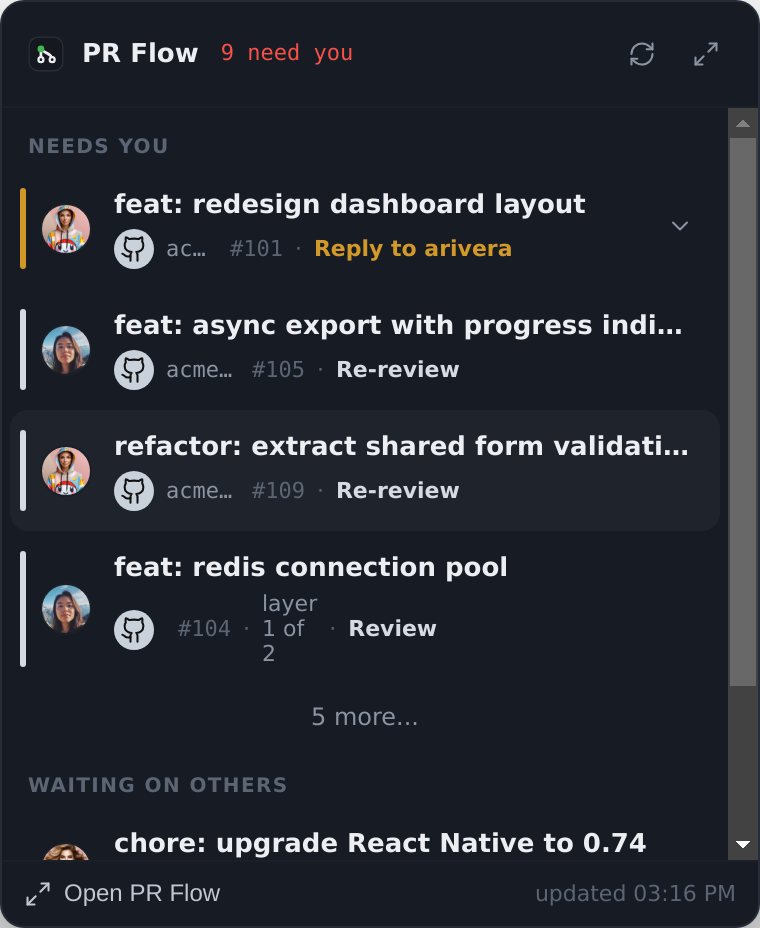
The tray shows a count and a compact glance at what needs you. Open the full dashboard when you want the rest.
- Attention count without opening the dashboard
- Top items in a compact glance
See the decision context in one slide-over.
Open a PR for branch and diff stats, unresolved threads, activity, and linked work. From there, open Review to inspect the diff and prepare your response. PR Flow never merges.
- Optional AI estimates for complexity, risk, and review effort
- Linked Jira, Linear & Trello tickets surfaced in context
- Stack awareness for dependent PRs

Every reason, with the evidence behind it.
The tab names the reviewer who asked for changes and quotes what they wrote. It also names the checks that failed, and the bot and file behind a finding.
- The tab appears only when that pull request needs something from you
- Each open reply thread lists its own last message, author, and file in the tab
- When a provider reports less detail, the tab says so

Use AI when you want another pass over the diff.
With an AI provider configured, enabled helpers can summarize a change, estimate risk, or surface findings. The result stays advisory; you decide what belongs in the review.
Use Claude, Antigravity, Codex, Ollama, or an OpenAI-compatible gateway. PR content goes directly from your machine to the provider you configured. They never pass through PR Flow's servers. A local provider keeps it on-device. See how local AI code review works in practice.
"Self-contained refactor; backoff math and the shared mutex are the parts to check. 3 unresolved threads — worth resolving before approval."

Review without rebuilding context in another tab.
Read the diff, reply to threads, act on findings, and prepare one review in the app. Comments and verdict stay staged until you press Submit.
The diff and the findings in one window.
A unified diff keeps files, threads, and optional AI findings together. When an author pushes updates after your review, inspect only the commits added since your last look instead of re-reading code you already approved.
- Re-review delta tracks what changed since your last approval or comment
- Human reviewers and CI bot comments are grouped separately
- Provider-specific review actions; Gerrit uses a Code-Review vote

Question the diff before you comment.
Scope a question to one file, one finding, or the whole PR. If an answer belongs in the review, turn it into a staged comment; AI cannot post it.
- Conversation stays beside the diff
- Selected answers join the pending review

Give each AI helper a defined job.
Every optional agent has a prompt and an explicit context grant. You choose which run.
Adjust a built-in or write your own.
Create an agent in a form or import YAML, choose when it runs, and group it into a profile.
- Grant each agent just the diff, PR details, tickets, or files it needs
- Findings pin to lines; notes gather beside the diff

Know exactly what you are installing.
Inspect a shared agent's prompt and context grant before installing it. The approved version keeps running until you choose to accept an update.
- Full prompt and context shown before install
- Browse the whole catalog on the web, install with one link

Useful when you need them.
Quiet nudges
Draft a nudge when a PR is stuck. You review it and choose when to send.
Thread summaries
When enabled, AI condenses a long thread into what was asked, clarified, and still open.
Complexity & risk
When enabled, AI estimates complexity and risk on the same green→amber→red ramp.
Stack awareness
Dependent PRs show their review order and warn when a lower layer changes.
Star & track
Star a PR to keep it easy to find, or track one by URL outside your normal queue.
Digest notifications
A scheduled OS notification shows what needs you and what has gone stale, at times you pick.
Keep the next move visible.
People still review, respond, and merge. PR Flow keeps the next action visible and the review context together.