One pull request dashboard for GitHub, GitLab, Gerrit and Azure DevOps.
One desktop queue for what Needs you, what is Waiting on others, and what can wait across GitHub, GitLab, Azure DevOps and Gerrit.

The next action is missing from a flat list.
Repository lists and notifications show activity. Review work still has to be sorted by who owes the next move.
They are scattered by design
A week can cross repositories and providers. Separate lists make you rebuild one queue from several tabs.
Notifications tell you what happened, not what to do
A push, comment, or failed check says what changed. It does not say whether the pull request now needs a review, a reply, a fix, or nothing from you.
Old work still needs a place
An ageing review stays visible even when newer activity arrives.
“Waiting on me” and “waiting on them” look identical
A review request needs your decision. A submitted pull request may be correctly waiting on someone else. PR Flow keeps those jobs apart.
Replies bring review work back
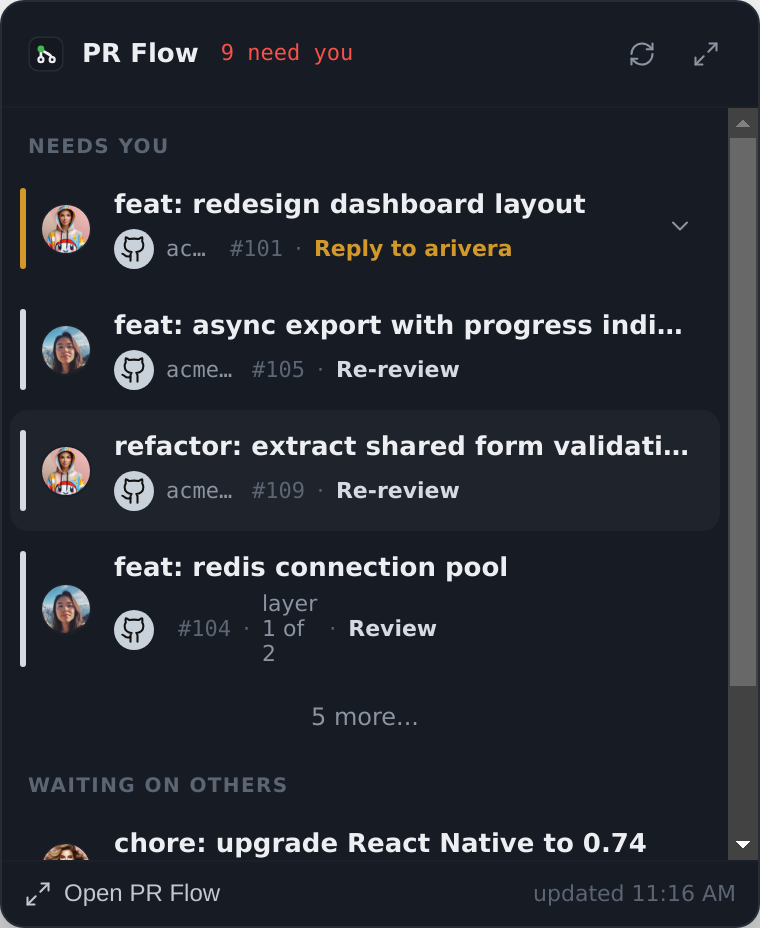
When a teammate replies to your comment, the pull request returns to Needs you with a Reply action. The open conversation is visible without replaying its history.
Classify first, then rank.
PR Flow classifies each open item by its current state, then orders the queue around the next action.
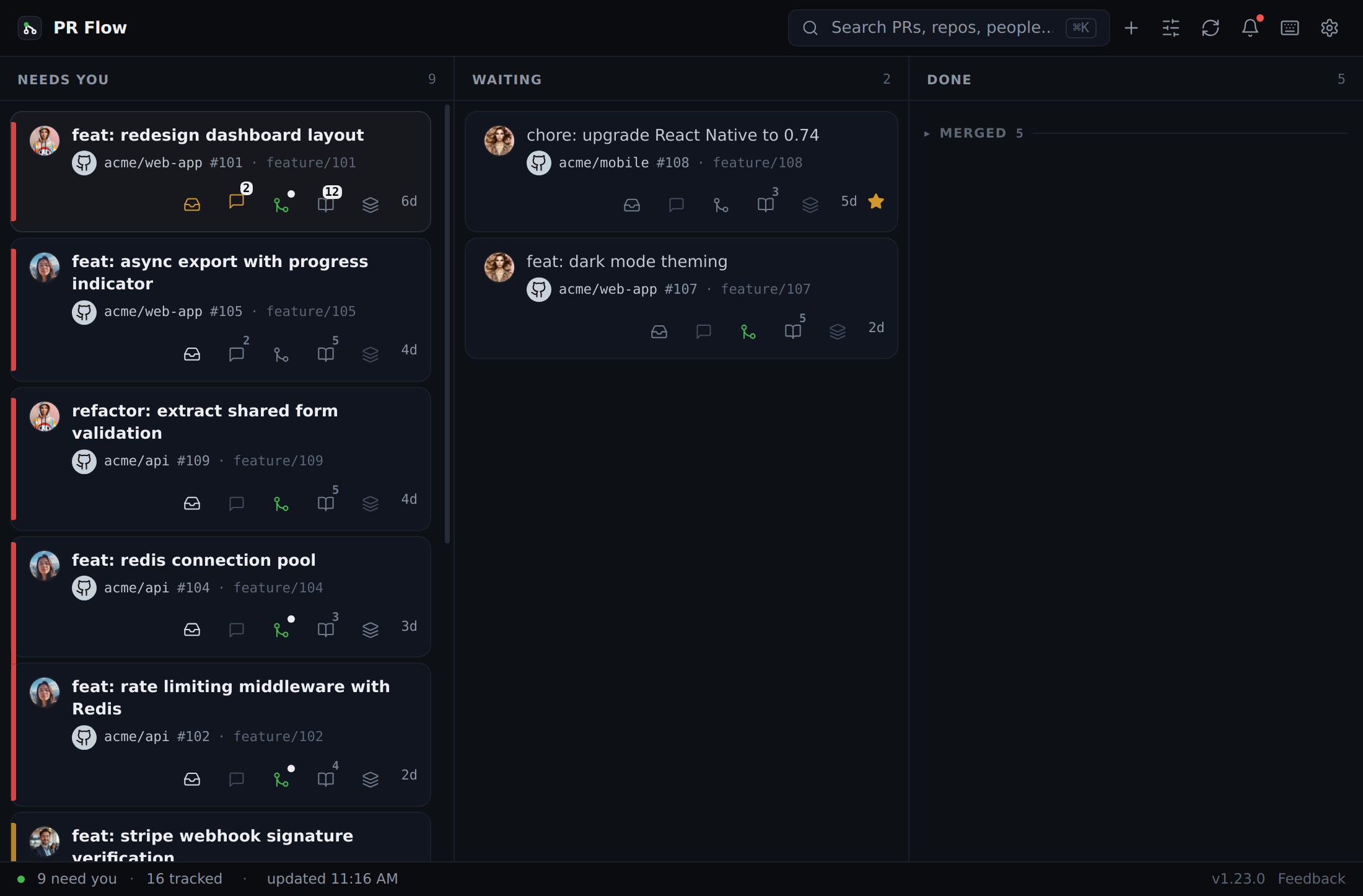
Reviews you owe, above your own work.
Reviews and replies you owe appear in Needs you. Submitted work can sit under Waiting on others; lower-priority work remains available without crowding the top.
- A 4px left border encodes age: fresh, warm, stale
- Smart views: Needs you · Your PRs · Waiting on others · Recently done
- State chips name review requests, replies and unresolved threads
The ordering rules are worth understanding on their own — how the review queue decides what is next.

Enough context to decide, without opening a browser.
Open a row for its branch, diff stats, unresolved threads, activity, linked stack, and how much reading it is — Quick, Medium or Deep dive. With Agent Pipelines configured, PR Flow also shows advisory complexity and risk.
- Linked Jira, Linear and Trello tickets shown in context
- Thread summaries when the helper is enabled
- Stage comments and submit the provider's supported review outcome

It connects the way each provider expects.
PR Flow normalizes pull requests, merge requests and changes into one model — but it connects to each provider on that provider's own terms, and keeps its vocabulary.
GitHub pull requests
Reads through your authenticated gh CLI session, so there is no extra OAuth app and no token to paste. Review requests, authored PRs and unresolved threads across every repository you touch.
GitLab merge requests
Reads through glab, including self-managed instances. Merge requests keep their own name and vocabulary rather than being relabelled as pull requests.
Gerrit changes
Connects directly to your Gerrit instance over its API with an HTTP password, and brings changes into the same ranked queue as everything else.
Azure DevOps pull requests
Native REST integration, configured with your organization URL, project and a personal access token stored in your keychain.
Repositories across your connected accounts
Turn a provider on and involved work visible to that connected account joins the queue.
Issue trackers too
Jira via acli, Linear via linear-cli, and Trello — so a pull request shows the ticket it belongs to.
Your repository data is not proxied by PR Flow.
PR Flow connects from the desktop app to each provider. PR Flow does not host a copy of your pull requests or diffs.
- Requests go directly from your machine to your providers
- PR Flow's servers do not receive your code, pull requests or diffs
- Credentials you enter are encrypted in the OS keychain
AI prompts go to the provider you configure. A localhost model keeps that prompt on your machine. See local AI code review, or the full security overview.

Scroll down it, or scan across it.
Use the feed for the next action or switch to the board to scan the same work by state.
Before you install it.
Is this a web dashboard or a desktop app?
Can it show pull requests from more than one provider at once?
How do I know whether a change I requested actually landed?
How does it authenticate?
Does it work with self-hosted instances?
Will it merge or comment on things without me?
Keep reading
GitHub pull request dashboard
Review requests, your own PRs and stale threads on GitHub, in one queue.
GitLab merge request dashboard
Merge requests across GitLab projects and self-managed instances.
Gerrit code review dashboard
Gerrit changes, patchsets and review labels alongside your other work.
Azure DevOps pull request dashboard
Azure DevOps pull requests ranked by whose move it is, with required and optional policies kept apart.
Pull request review queue
How PR Flow decides which review needs you next, and why that beats a feed.
Stacked pull requests
Stacks as one ordered journey — position markers, a map, and layer-by-layer review.
Local AI code review
AI review on your own provider — a CLI, a local model, or your gateway.
From the blog
Why Pull Requests Sit for Days Between Reviews
A PR can take twenty minutes of real review and still take a month to close. Where that time actually goes, and why AI widened the gap instead of closing it.
Who Owns the Next Move on a Pull Request?
Open, review requested and approved don't answer who has to act next. A plain event-driven model for pull request ownership, and where it stops helping.
What a Stale Pull Request Means and What to Check
Before you ping the author of an old pull request, read the last exchange. What to do when it is blocked, replaced, approved but unmerged, or forgotten.
Keep the next action visible.
You still review, respond and merge. PR Flow keeps the queue and review workspace ready. Try it free for 7 days; a one-time licence keeps it after the trial.