A pull request review queue ordered by what needs you next.
See what Needs you, what is Waiting on others, and what can wait. PR Flow classifies open review work by its next action and keeps that action visible.

A queue names the next action.
Activity feeds and repository lists remain useful. PR Flow adds the action order between them.
A notification feed
Ordered by when something happened: a push, comment, or check result. Useful for history, but it does not name the current owner.
A repository PR list
Ordered by where the code lives. Useful for one project; less useful when review work crosses repositories or providers.
An attention-ordered queue
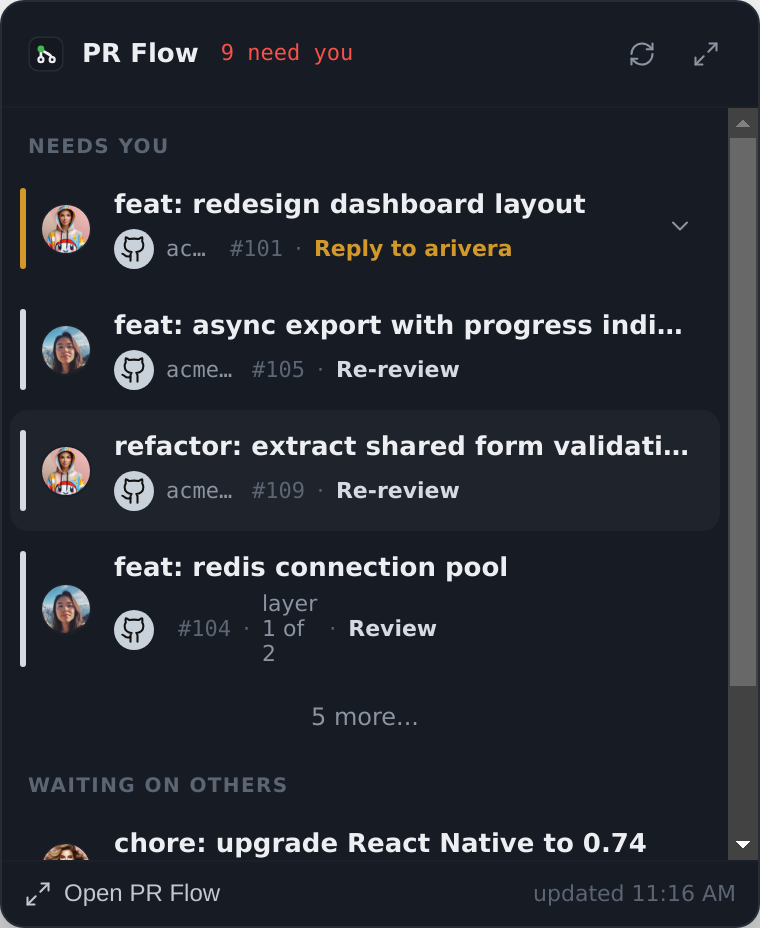
Ordered by who owes the next move. The top rows are reviews, replies, fixes, or merges that currently need you, unless you pin an exception.
Classify by state, then rank by who is waiting.
Owed reviews surface above submitted work.
Requested reviews and replies appear in Needs you. Submitted work can sit under Waiting on others until someone replies or the state changes. Pinning an item is the deliberate exception to that order.
- Needs you — a review requested, or changes requested on your PR
- Your PRs — what you opened, and what is holding each one up
- Waiting on others — correctly out of your hands, and quiet

Stale pull requests get harder to ignore, not easier.
A coloured border shows age on the row itself. Fresh, warm, and stale work can be scanned without opening a separate report.
- Fresh, warm and stale rendered on every row
- Digest notifications call out what has gone stale
- Choose a teammate and preview a nudge before sending it
Signals that say who currently holds the ball.
Unresolved threads
Counted on the row. When a teammate replies to your comment, the PR returns to Needs you with a Reply action.
Review state
Review requested, changes requested, approved, draft, merged — the actual state of the pull request rather than the last thing that happened to it.
Age and staleness
How long the current state has held. The signal that makes blocked work visible instead of letting it sink.
Your own override
Star anything to pin it to the top, and track any pull request by URL even if it is outside your usual repositories.
Effort, when you enable AI
With Agent Pipelines configured and the helper enabled: advisory complexity, risk, and effort, captioned with the provider and model.
Stack position
Dependent pull requests carry their layer position and open into a trunk-to-top map.
A queue is only useful if you can work it.
Open the top item in the review workspace, stage comments, submit, then move to the next queue item.
- Full unified diff with per-file “viewed” tracking
- Submit each provider's supported review outcome; Gerrit keeps its Code-Review vote
- “Submit & next” moves you straight to the following item
- Comments stay staged until you submit them
The queue spans GitHub, GitLab, Gerrit and Azure DevOps at once.

How the queue behaves.
Can I override the ordering?
How does it know something has gone stale?
Will it notify me constantly?
How does PR Flow judge how big a review is?
Does the queue work without AI turned on?
Keep reading
Pull request dashboard
One ranked queue for pull requests spread across repos and providers.
GitHub pull request dashboard
Review requests, your own PRs and stale threads on GitHub, in one queue.
GitLab merge request dashboard
Merge requests across GitLab projects and self-managed instances.
Gerrit code review dashboard
Gerrit changes, patchsets and review labels alongside your other work.
Azure DevOps pull request dashboard
Azure DevOps pull requests ranked by whose move it is, with required and optional policies kept apart.
Stacked pull requests
Stacks as one ordered journey — position markers, a map, and layer-by-layer review.
From the blog
Why Pull Requests Sit for Days Between Reviews
A PR can take twenty minutes of real review and still take a month to close. Where that time actually goes, and why AI widened the gap instead of closing it.
Who Owns the Next Move on a Pull Request?
Open, review requested and approved don't answer who has to act next. A plain event-driven model for pull request ownership, and where it stops helping.
Stop Chasing Pull Request Reviews in Slack
Manual pings and standup reminders happen because review handoffs leave no visible trace. Why broadcast channels get muted, why DMs burn patience, and what actually replaces them.
The Context-Switching Cost of Code Review
Reviewing unfamiliar code means building context, then recovering it when updates arrive. How to batch reviews and make the next pass easier to pick up.
When Does a Pull Request Need Another Review?
A reply, a focused fix and rewritten history need different follow-up. Check what happened after your pull request review before opening the full diff again.
How to Triage a Growing Pull Request Review Queue
Choose your next PR review by the action needed, who is blocked and how long the handoff has waited. Keep queue order separate from review depth.
Is a Ticket Waiting on Code Review Blocked?
When a Jira issue sits in review for days, is it blocked or just queued? A test for when a review wait becomes a blocker, and what to write down when it does.
Keep the next review action visible.
You still review, respond and merge. PR Flow keeps the queue and review workspace ready. Try it free for 7 days; a one-time licence keeps it after the trial.