Impediment Ledger for Jira
When an issue is flagged, the app asks why. Each blocker keeps its reason, an owner, an expected unblock date and, at the end, what resolved it. How long it was blocked comes from Jira's own history.
Built on Atlassian Forge. The app makes no network calls outside Atlassian.
By the retrospective, the flag is gone, and so is the reason.
Someone may remember that an issue was waiting on another team. Nobody remembers for how long, or what finally moved it. The app keeps that record while the flag is still up.
The reason
Each blocker gets a reason from a short list your Jira admin controls, plus an optional note. Reports group the time by reason, and by whether it was internal or external.
Owner and expected date
An owner and an expected unblock date are optional. Once the date passes, the blocker shows as overdue.
How long
A blocked period starts when the issue is flagged (or, if your admin chose them, enters a blocked status or gets an “is blocked by” link) and ends when the last of these ends. The times come from the issue's history in Jira, so nobody starts or stops a timer.
The resolution
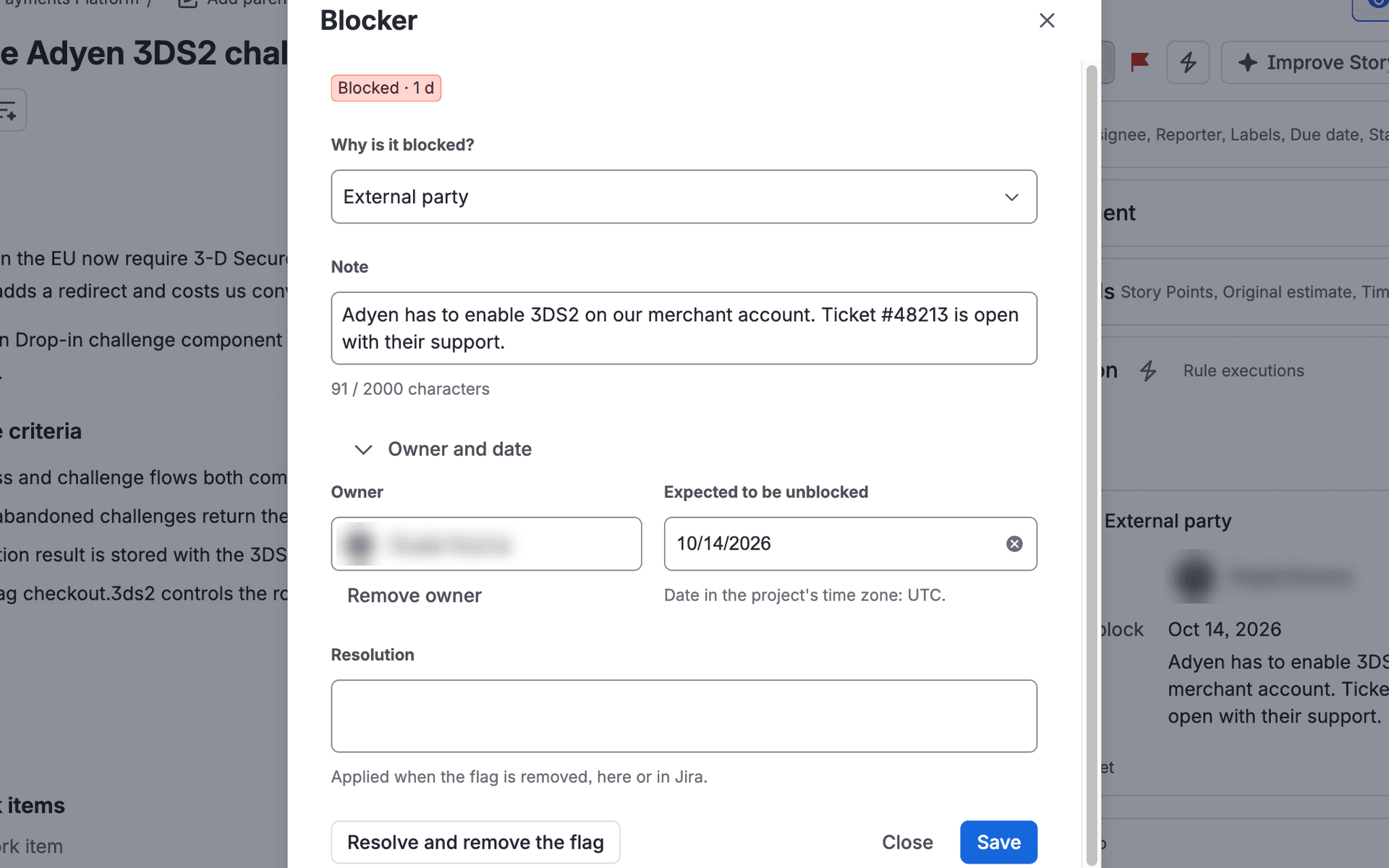
The resolution can be written while the issue is still blocked. It is confirmed when the flag is removed, in the app or in Jira.
Keep flagging the way you do. The app adds the why and the who.
How long each issue was blocked comes from Jira's history, and the flag itself stays in Jira.
A reason, a few seconds after the flag
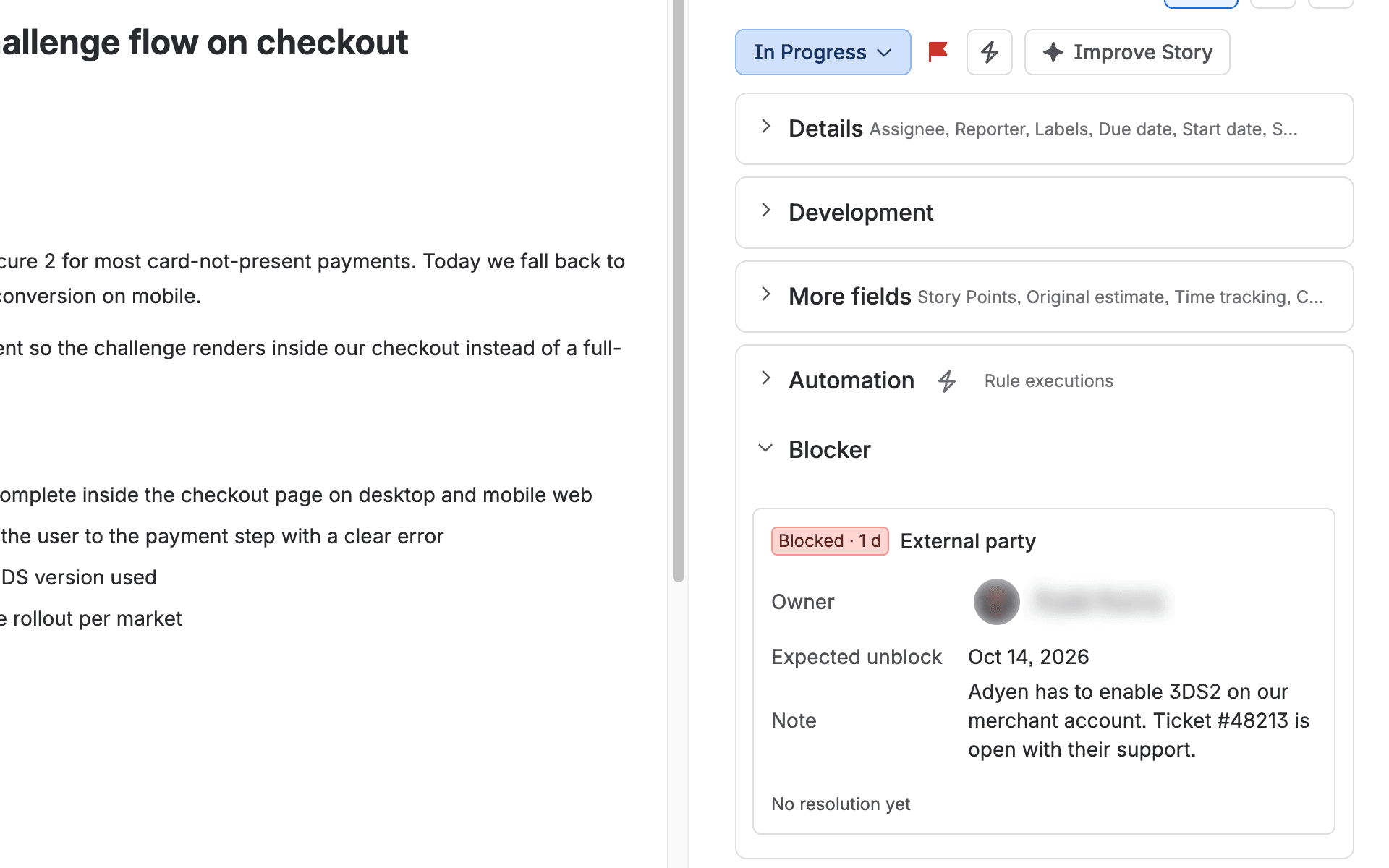
Flag an issue from the board, the issue ••• menu or Automation. Its Blocker panel then shows Flagged, no reason with a Why is it blocked? list, and picking a reason saves it.
A note typed into Jira's own Add flag dialog becomes the blocker's note when it has none yet, and a note typed when removing the flag becomes the resolution. Only flag comments everyone on the issue can read are used.
Owner, date and resolution in one dialog
Open Blocker from the issue ••• menu for a note, an owner or an expected unblock date. The resolution can be drafted ahead and is confirmed when the flag comes off.
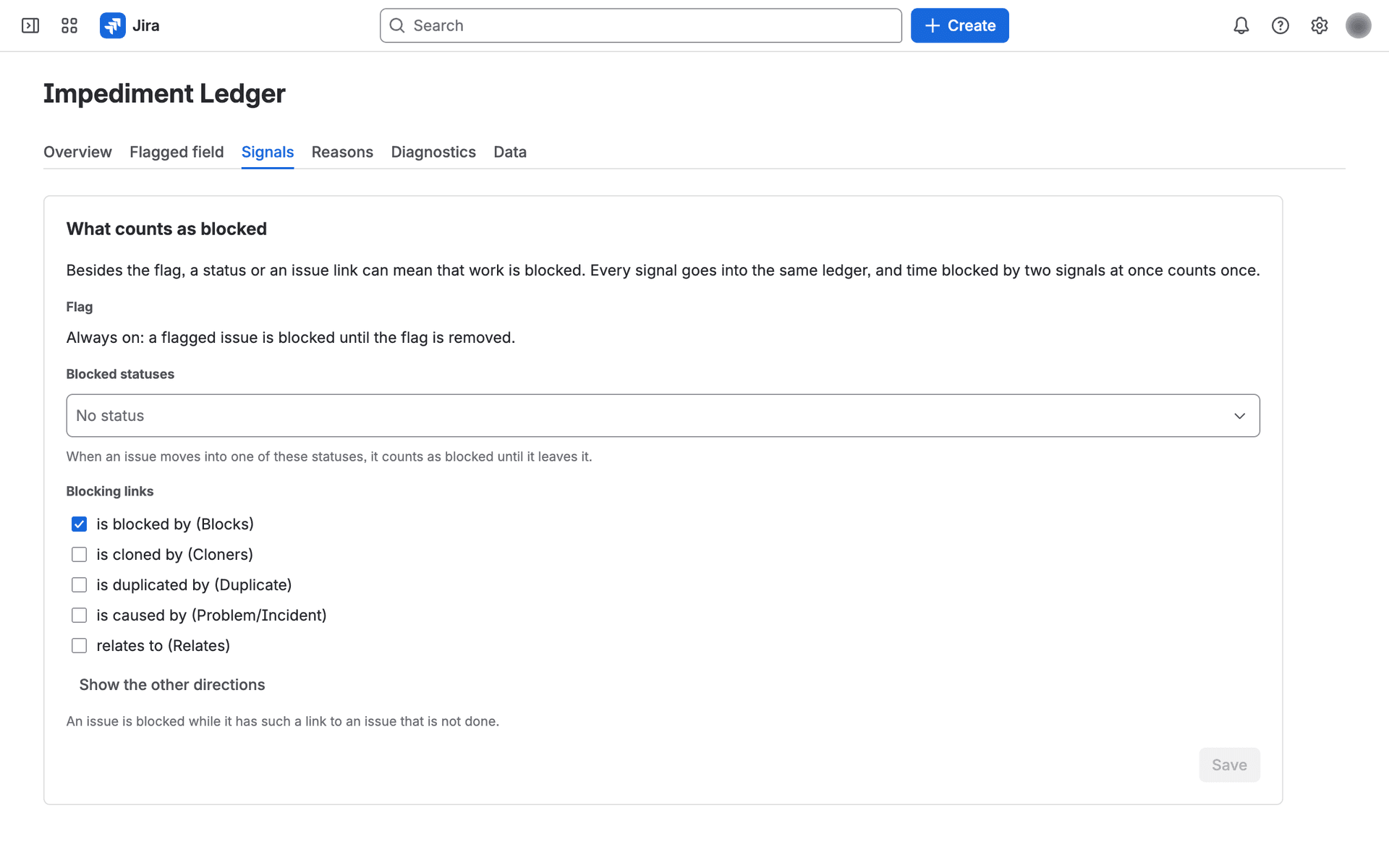
Flags, blocked statuses and “is blocked by” links
The flag always counts. When tracking is turned on in your site's first project, the app also counts statuses whose name clearly means blocked (such as “Blocked”, “On Hold” or “Waiting”) and “is blocked by” links to issues that are not done. An admin can change or remove these on the Signals tab.
Time held by two signals at once counts once. The app reads statuses and links and never changes them.
Blocked now
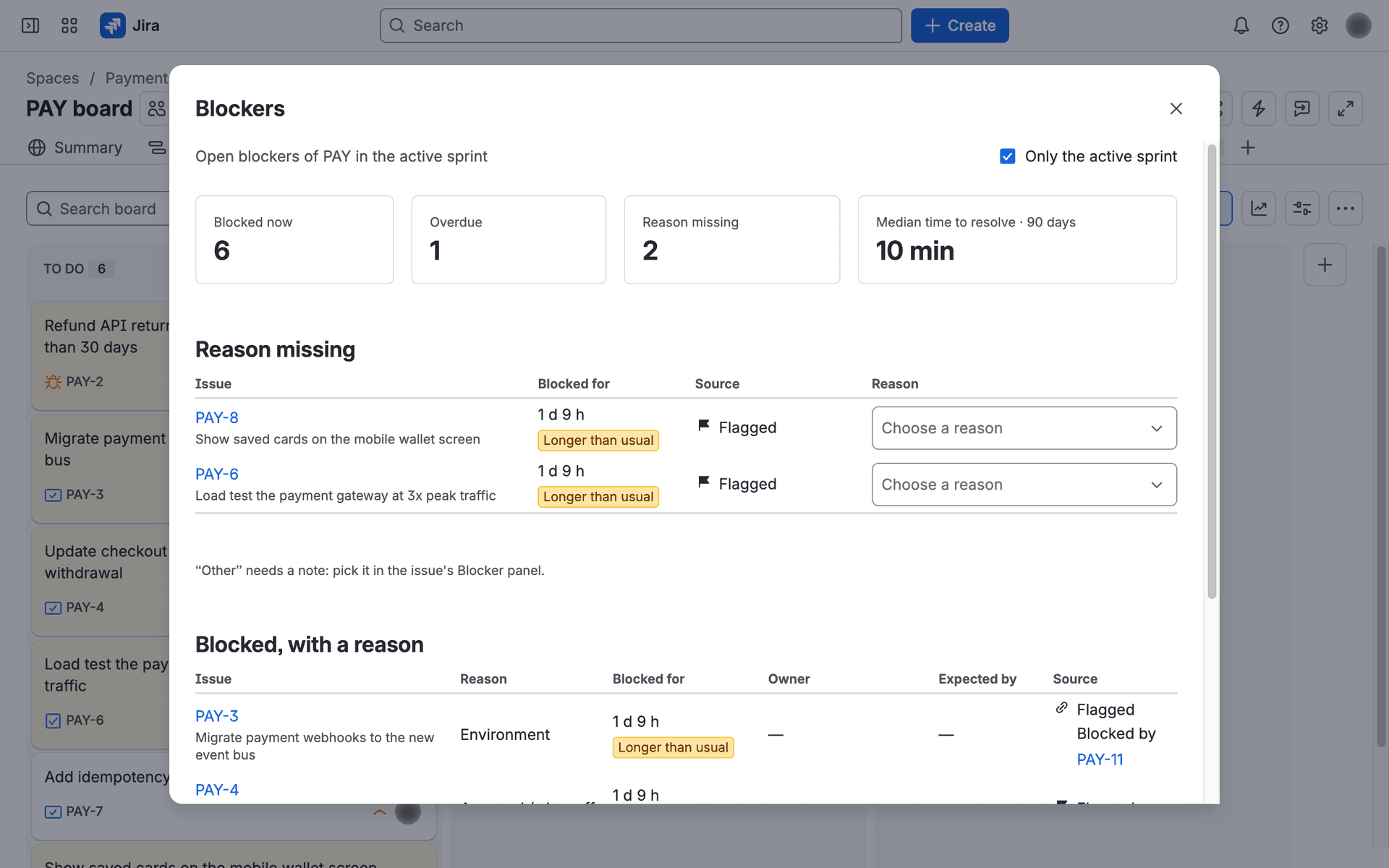
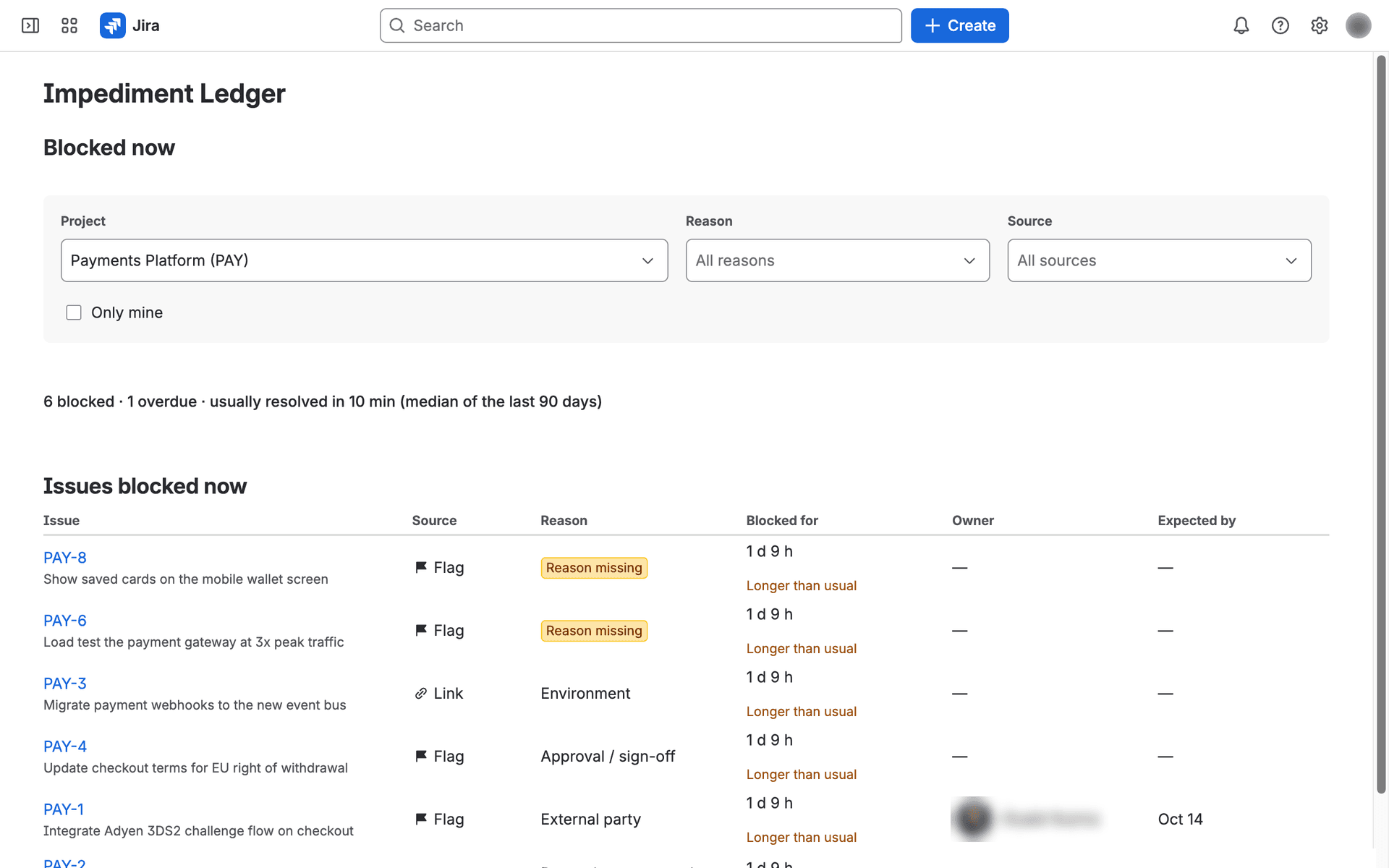
A project's open blockers, oldest first, filtered by reason, by source (flag, status, link) or by “mine”. The header shows how long a blocker usually takes to resolve: the median of the last 90 days.
Reason missing
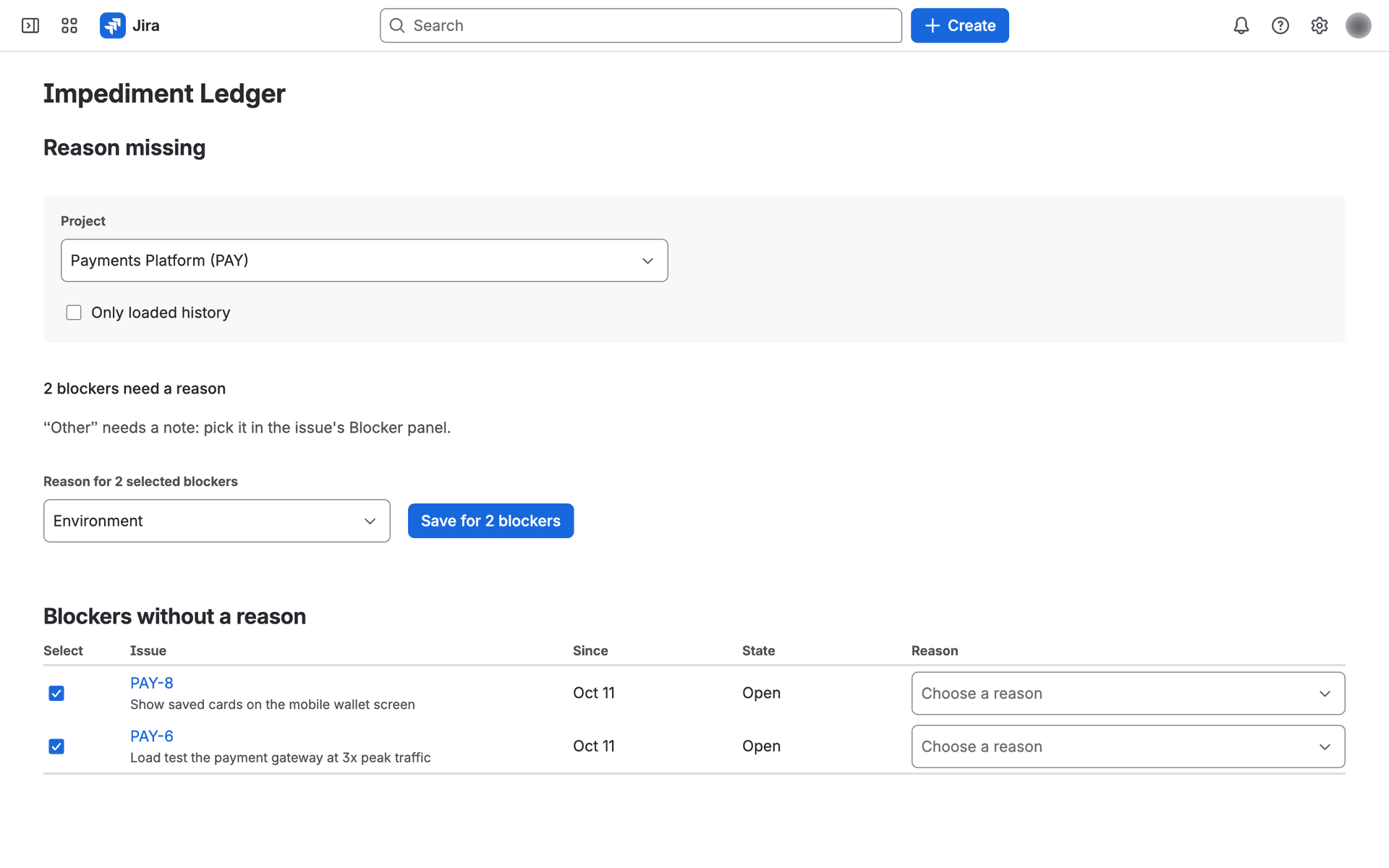
Blockers without a reason, with the reason list right in the row. Select several rows, pick one reason and choose Save for N blockers. A row someone changed in the meantime says so and stays selected.
Reports by reason, and a Retro page
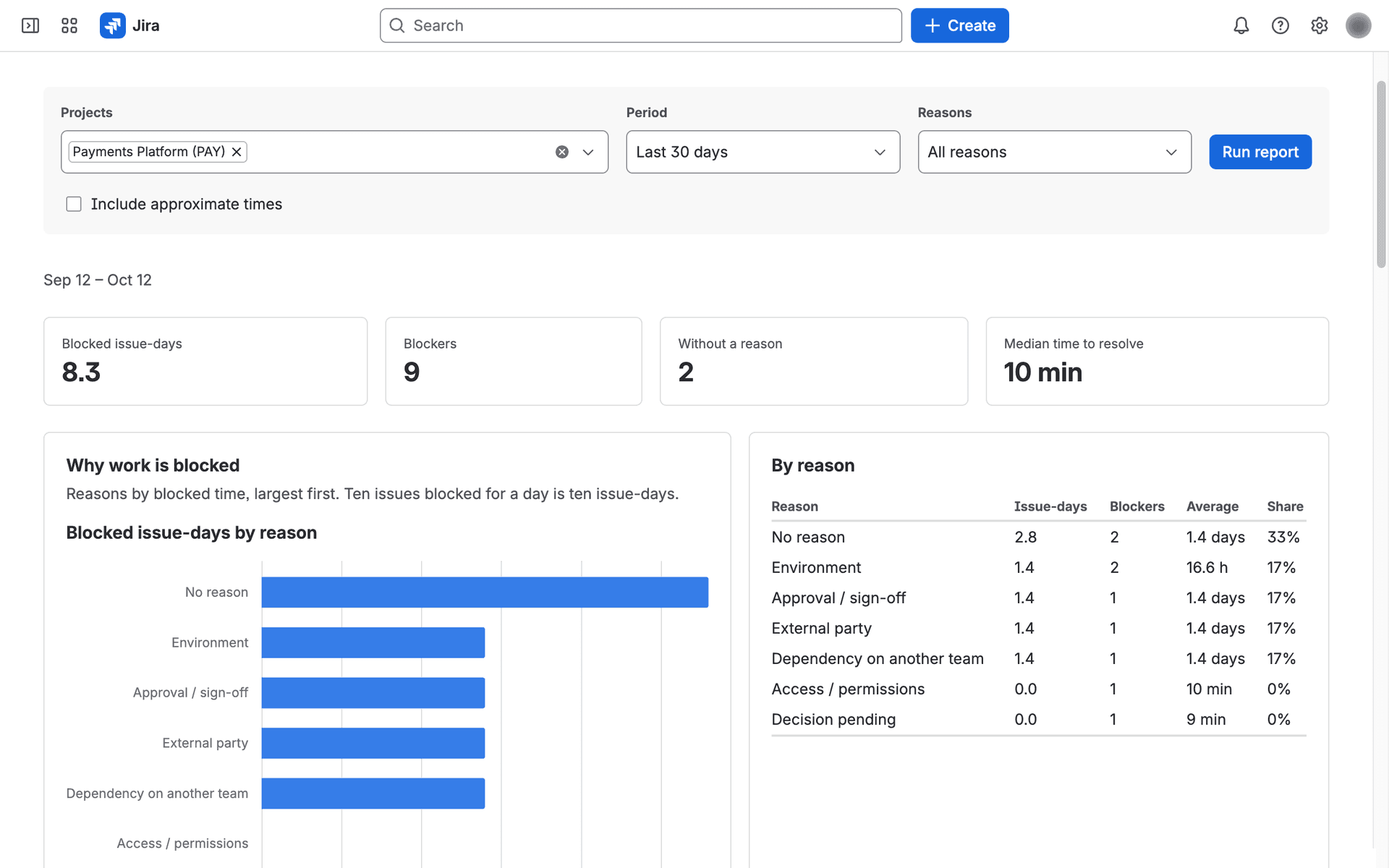
Blocked time by reason (Pareto), a weekly trend, how long blockers last, repeat blockers and open blockers by owner, each chart with a table. Blocker clustering puts each reason on one row: how many blockers, how many issue-days, and how long the typical and the slowest ones took (P50, P85, P95).
Retro shows the top reasons of the last two weeks with their notes and resolutions. Copy retro notes prepares Markdown for a Confluence page.
Reasons your admin can shape
Built-in reasons can be renamed, hidden or archived, and you can add your own, up to 20. Not a blocker covers teams that also flag for other purposes: the flag stays in Jira, and reports leave it out.
A Blockers menu on the board
Board cards cannot show the app's reasons (a Jira limitation), so the board's ••• menu gets Blockers. The same dialog opens from the backlog and from a sprint card. Past the project's usual time to resolve a blocker reads Longer than usual; past its expected date, Overdue.
History from before tracking started
The first time a project's tracking is turned on, you can load the last 30, 90 or 180 days (at most the retention period). The app rebuilds that period's blockers from Jira's history with exact times. They arrive without reasons, ready for the Reason missing page.
CSV export
A weekly summary or one row per blocker. Notes are never exported, and rows only cover issues the person exporting can browse. A partial report (over 2,000 blockers) has no per-blocker CSV.
JQL fields
ilOpen = 1 finds open blockers, ilReasonMissing = 1 those without a reason, and ilCategory filters by reason. The search index updates a few seconds after a change.
A Rovo agent, if your site has Rovo
Ask what is blocking a project right now, which reasons cost the most blocked time, or which blockers are missing a reason. It sees what you can see in the app and never reads notes.
In your language
The app is available in English, German, French, Spanish, Japanese and Hungarian. The Rovo agent is set up to reply in the language you write in, though its name and suggested questions are in English.
Jira's permissions, everywhere
You only see issues you can browse in Jira. Report counts, CSV rows and the Rovo agent's answers are filtered the same way.
Built-in reasons
- Dependency on another team
- External party
- Decision pending
- Approval / sign-off
- Scope / requirements clarification
- Review / internal capacity
- Environment
- Access / permissions
- Technical issue / defect
- Other
- Not a blocker
Dashed: counted as external by default
Stored in your site's Forge storage, on Atlassian's infrastructure.
The app makes no calls outside Atlassian, has no external analytics or logging, and calls no LLM itself. We, the publisher, have no access to the data.
If you use the Rovo agent, Rovo receives what you could already see on screen: issue keys and summaries, reasons, durations, expected dates and owner account IDs. Never notes or resolutions.
What it stores
Issue and project IDs, blocked periods and what held them (the flag, a status name, a blocking issue), reasons, notes, expected dates, resolutions, a change log, and Atlassian account IDs for owners and for who changed a blocker. It keeps no names, email addresses or issue summaries as fields. Notes are free text, so keep personal data out of them.
How long
Closed blockers are deleted after the project's retention period, 365 days unless a project sets less. A Jira admin can export every stored record as JSON Lines.
What the logs hold
The operation, its outcome and an error code. Never notes, account IDs or issue content.
When you uninstall
Atlassian keeps the app's data for 28 days, then deletes it. Reinstalling does not restore it automatically.
What it does not do.
Replace your board
The board stays Jira's. Reasons appear in the Blockers menu and in each issue's Blocker panel.
Keep two open blockers on one issue
An issue has at most one open blocker at a time. Flagging it again after it closed starts a new one.
Set the flag by default
Out of the box the app only reads the flag. Setting and clearing it from the app is off by default and has to be enabled for your installation; a Jira admin then runs a flag-writing test and allows it project by project.
Count business hours
Durations are calendar time, with no business-hours or holiday calendars. A blocker over a weekend counts the weekend.
Work in Jira Service Management
Service management projects are not supported. Company-managed Jira Software projects are the main target; a team-managed project works when its Flagged field passes the app's configuration check.
Report on more than 2,000 blockers at once
A report reads at most 2,000 blockers. Above that it says it is partial; a shorter period or fewer projects gives the full figures.
Sold through the Atlassian Marketplace.
Atlassian handles the subscription, billing and licensing. With an inactive license, tracking, the app page, reports, CSV export and the Rovo agent pause; each issue's Blocker panel stays readable and the admin data export keeps working.