Agent Pipelines
Build your own small AI review agents — and run the community's.
Agent Pipelines let you build your own small AI review agents and run them on any pull request. Each agent is a short prompt plus an allowlist of the context it may read — the diff, the PR details, linked tickets, specific files, or recent commit history. Agents are advisory only: they see just the context you grant them, and they can never post, approve, merge, or otherwise change the pull request.
Everything lives under Settings → Agent Pipelines.
PR Flow's AI is one switch
Agent Pipelines is PR Flow's AI switch, and it starts on. All of PR Flow's built-in helpers — deep review, PR complexity and risk, review-thread summaries, the review-summary draft, and the discuss assistant — appear right in your Agent Pipelines list, badged Default. Switch each one on or off individually, and tailor any of their prompts to your team's voice (a one-click Reset restores the original). However you rewrite a built-in helper's prompt, its results stay dependable — the required output format is always applied.
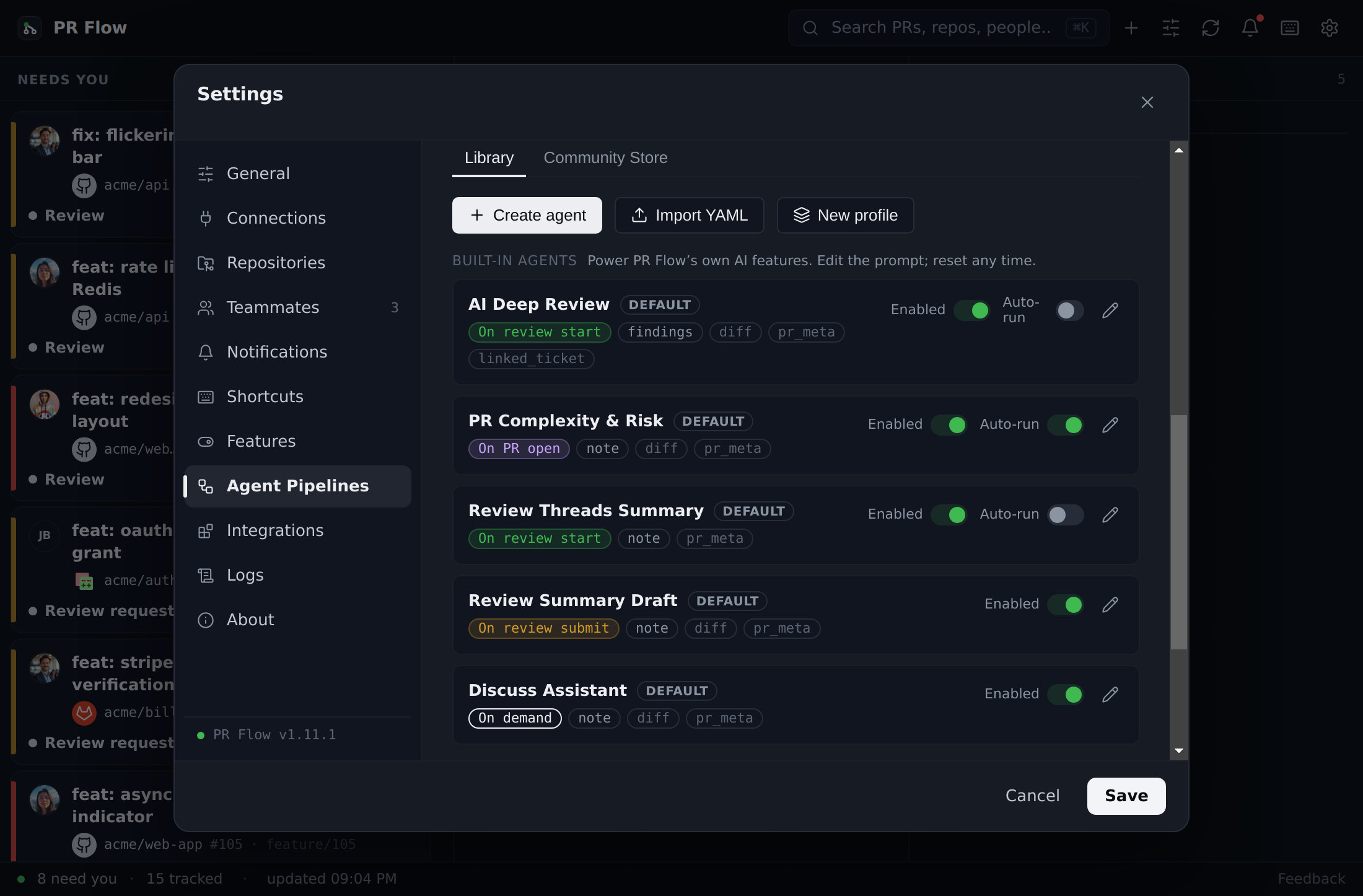
Upgrading from an older version carries your setup forward untouched: whatever you had on stays on, anything you'd turned off stays off, and an active license turns the whole set on for you.
You choose which AI provider runs your agents — a CLI, a local model, or a company gateway. See AI Features for provider setup and per-task routing.
Building an agent
Create an agent with a simple form, or by pasting or importing YAML. An agent has:
- A prompt — the instructions the agent follows.
- Context — the allowlist of what it may read (see below).
- An output type — either inline findings (severity-tagged notes pinned to specific lines, which you can dismiss or turn into review comments) or a freeform note you can copy. (PR Flow's own Change Story guide produces a third kind, a guided path through the diff; authoring your own is not available yet.)
- A trigger — the moment it runs.
Three optional settings tune how much an agent has to say. Paths limit it to pull requests that touch matching files, so a frontend agent doesn't burn a run on a database migration. A severity floor hides anything below the level you set — the most effective way to quiet an agent that's technically right but too chatty. A maximum findings budget caps how many it may report; leave it empty unless you want a deliberately narrow agent, since findings aren't capped by default and telling a model it may report N things nudges it toward finding N things.
You can export any agent you build to a file to share it.
Context is the privacy boundary
Context selectors are the only way information reaches the model — the prompt can never ask for more than you granted. Each selector maps to one thing:
| Selector | What the agent sees |
|---|---|
| Diff | The pull request's code diff |
| PR details | Title, description, changed files, and open review threads |
| Linked ticket | Tickets referenced by the PR (e.g. a Jira issue) |
| A specific file | One file at the PR's latest commit |
| Commit history | Recent commit subjects and authors on the changed files |
| Your local checkout | Existing code from a repository you mapped and separately granted access to — see Change Story |
| Public web search | Provider-native search for public, version-relevant documentation; existing agents must opt in explicitly |
Agents run with no ability to read your wider filesystem or run commands. Repository discovery is performed by PR Flow inside the mapped repository, within fixed path, search, result, round, and character limits. Native web search is a separate selector and is enabled only on providers that can expose it without granting filesystem or shell access. Because a shared agent's prompt might come from someone else, the input arrives through the selectors you approved and the output is validated before anything is shown.
That holds for the local-checkout selector too: PR Flow reads files and literal search results itself, at a fixed revision, and passes the result along like any other context. It can follow a reference into another file over as many as three bounded rounds. The agent is never handed the ability to browse your disk, your uncommitted work is never included, and files holding credentials are refused however the prompt is worded. Grants are tied to the agent instructions and selected AI destination, so editing an agent or rerouting it asks again.
The reverse direction is covered too. A diff, a PR description, or a review comment is written by whoever opened the pull request, so agents are told plainly that everything in their context is material to review and never an instruction to obey — text in a diff that tries to address the agent gets reviewed like any other content, not followed.
When agents run
An agent's trigger is the moment it fires:
- When the PR appears on your board — great for board-wide pre-evaluation; runs once per pull request.
- When you push a draft of your own PR — a first look before anyone else sees it.
- When one of your PRs starts conflicting — a heads-up the moment it happens.
- When you open the review — its notes are ready as you start reading.
- When you open the review submit sheet — ready as you write your summary.
- On demand — from the pull request's AI insights card, the review's AI menu, or a keyboard shortcut.
Automatic runs are yours to govern. One master Automatic triggers switch pauses every self-starting run — custom and built-in alike. You also choose how many agents run at once and set an hourly per-repository safety cap. On-demand runs and the ones tied to actions you took (opening a review, pressing a button) are never held back.
If an automatic agent fails repeatedly, PR Flow pauses further automatic attempts on an escalating schedule — first for minutes, then longer if failures continue. The agent row shows when it will try again, while on-demand runs stay available for testing or recovery. Any successful run clears the pause.
A note on honesty: a true "before you publish" moment isn't something PR Flow can observe from the outside, so "when you push a draft" means as the draft is pushed.
Running agents
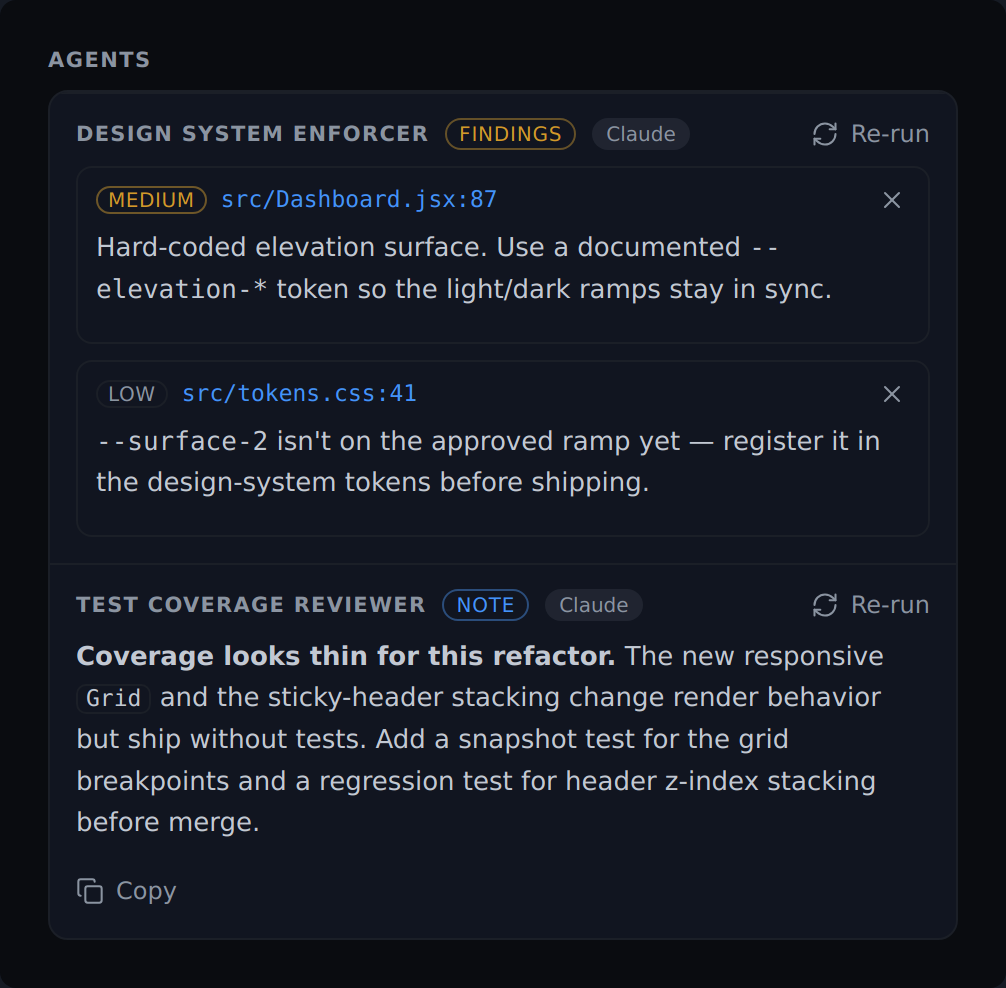
Every AI result a pull request has lives in one AI insights card in the detail view: the built-in helpers you left switched on, and each of your own agents that writes findings or a note — whatever trigger you gave it. The card's menu lists them all with what each one currently has to say, and you tick exactly which to run: one agent, a few, or all of them. Findings arrive tagged to the lines they flag and a note renders as formatted text you can copy, each labelled with the provider and model that actually produced it. In the in-app review, findings show as inline pins tagged with the agent that raised them — so running the card before you open the review means the results are already waiting when you start reading.
The review's Comments view collects everything in one place, grouped by where it came from: Human feedback, Bots, AI findings, and My staged comments. The bot group uses the same bot accounts you configure in Settings, so a coverage report or a dependency bump doesn't dilute the count of things a person actually said. Each group shows how many items are still outstanding and is hidden entirely when it's empty, so an AI-only or human-only review reads as cleanly as a mixed one. Resolved conversations and dismissed findings stay one click away without counting against the total, and every row carries the file and line it belongs to — selecting it jumps straight there.
The Community Store
Discover and install agents others have shared from the Community Store tab — or browse the full catalog on the web in the Agent Gallery. The Code Reviewer, Security Reviewer and Architecture Reviewer pages each show the full prompt and context allowlist, which is the clearest way to see what a real agent is made of before installing one.
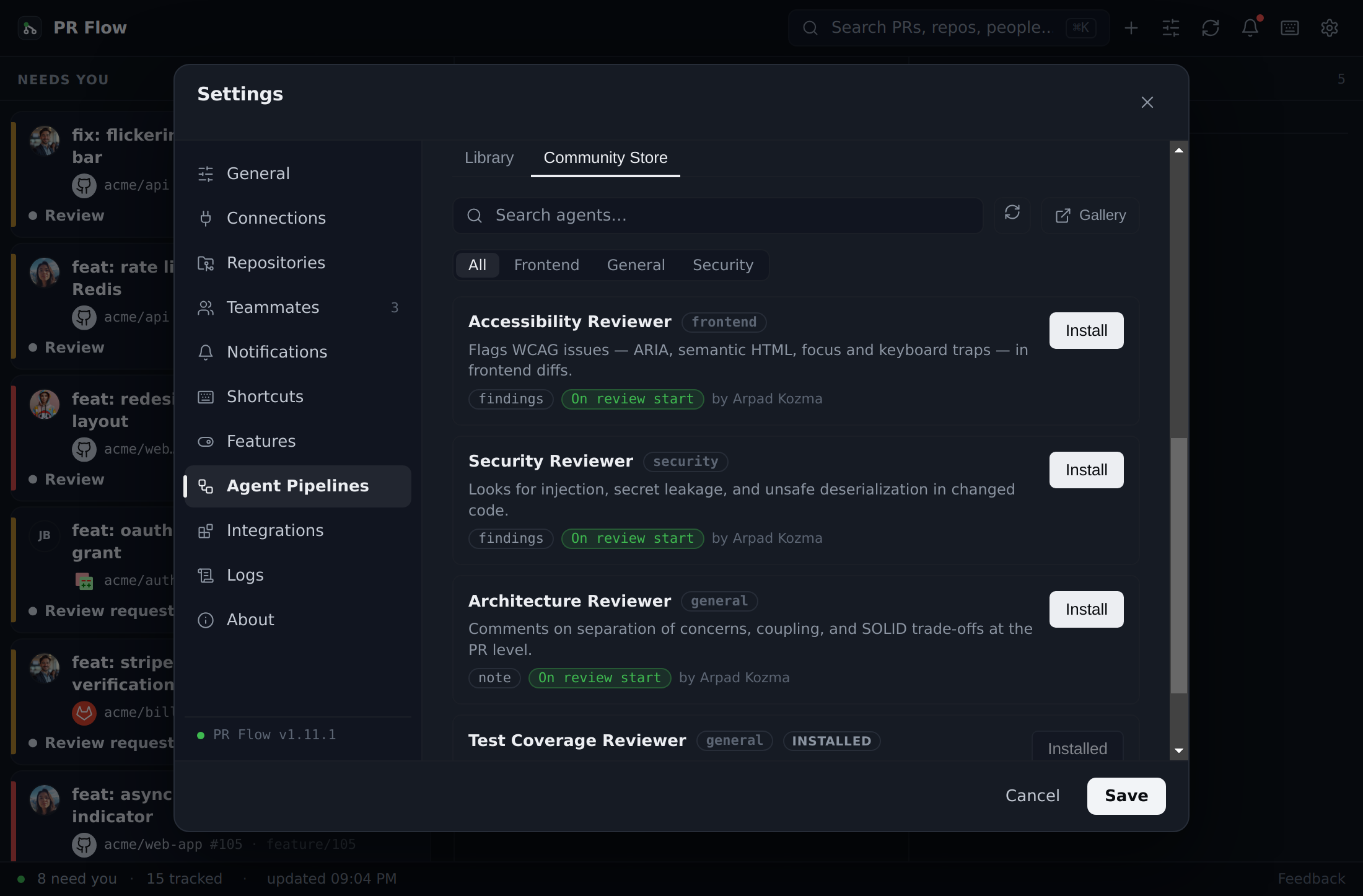
Every install shows you the agent's exact prompt and the precise context it's allowed to read before anything is saved. If a shared agent you use is later updated, the version you approved keeps running until you review and approve the change. Edit an installed agent and it's clearly marked Edited, so you always know it differs from what you approved. You can also install an agent straight from the web with a one-click link — it only ever opens the approval screen, never installs silently.
If an approved install overlaps an active agent in the same trigger and output slot, PR Flow keeps the new agent switched off and explains the conflict instead of silently replacing your current setup. You can jump straight to the Agent Library to choose which agent should occupy that slot.
Share your own. The store is an open, community-run catalog on GitHub. Publish an agent by opening a pull request against the community agents repo — its contribution guide walks through the agent format and how entries are reviewed.
Profiles
Group your agents into profiles — named, switchable sets — and flip which set runs in a single click. Keep one lineup for reviewing and another for architecture work.
Keeping agents useful
PR Flow keeps a metadata-only record you can inspect and export:
- Settings → Logs → Agent runs — every run, with which agent ran, what triggered it, how long it took, and the outcome. Prompts and results are never stored there. Export the whole log to JSON for your own audit.
- Dismiss-rate hint — if most of an agent's findings end up dismissed, its row shows a gentle nudge to tighten the prompt. This is measured entirely on your own device — PR Flow sends nothing home.
For teams
An administrator can push a shared profile of agents to everyone, with required agents that always stay on, and can lock any built-in AI helper on or off across the team. Managed agents and profiles remain read-only on each seat, so a local agent can't overwrite an organization-owned identifier. As with all of PR Flow's AI, prompts and code go only to the provider you choose — reach out for Enterprise setup.