AI Features
Let AI read the diff before you do.
PR Flow doesn't sell you an AI model — it orchestrates the AI you already trust. Prompts, code, and results never touch PR Flow's servers; inference runs wherever your provider runs. You pick the provider (or a different one per task), and every result is labelled with exactly what produced it.
All of PR Flow's AI lives behind a single switch, Agent Pipelines, and it is on from the start — on a trial or a paid licence alike. Deep review, complexity and risk, thread summaries, and the rest are built-in agents it brings with it, each switchable on or off individually and tailorable to your team's voice. The one thing you do need to set up is a provider: agents can't run until you point PR Flow at one, and Settings says so plainly rather than leaving the feature looking broken. This page covers choosing that provider and what the built-in helpers do; to build your own agents, see Agent Pipelines.
Choosing your AI provider
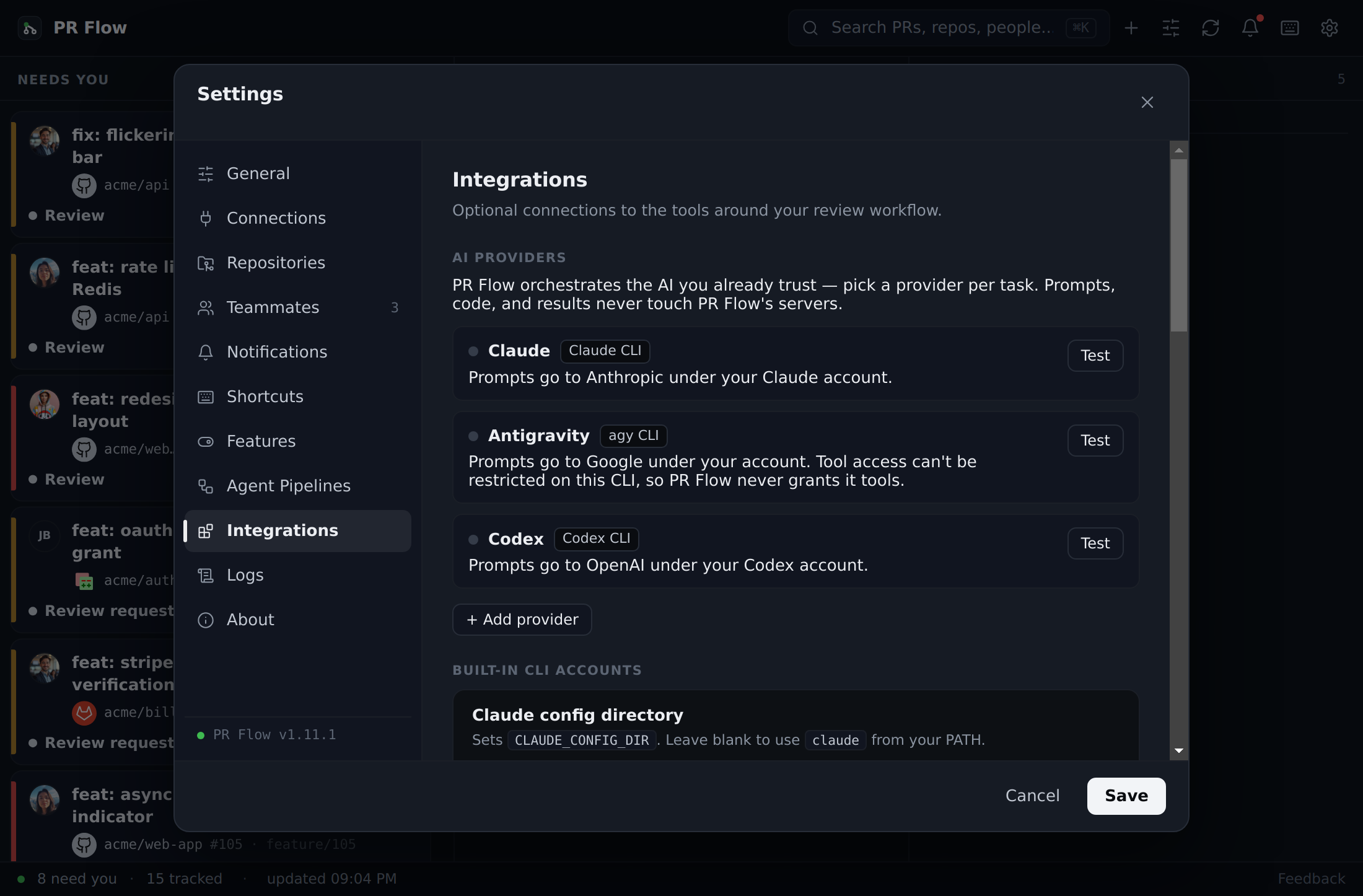
Configure everything under Settings → Integrations → AI providers. You can use any of:
- Built-in CLIs — the Claude, Antigravity, or Codex command-line tools, authenticated with your own account. PR Flow can supply the same authorized repository context to each of them.
- Ollama or any OpenAI-compatible endpoint — point PR Flow at a local model server (Ollama, LM Studio, llama.cpp, vLLM, LocalAI) or a hosted/company gateway. Prompts to a
localhostendpoint never leave your machine. - Any local CLI — bring your own command-line AI tool (aider, llm, opencode, ...) by giving PR Flow its command and how to pass the prompt.
Each provider row shows a plain-English data-flow label (where its prompts go), a Test button, and — for hosted endpoints — an API-key field that's stored encrypted and never written to your settings file.
For a team-managed HTTP gateway, the administrator supplies the approved endpoint and model while each seat enters its own API key locally. The key receives the same encrypted local storage as a personal provider and is never placed in the team's license policy. Custom CLI providers are also checked before saving: argument- and file-based delivery must include the required prompt destination, so a run can't silently invoke a tool without the review prompt.
Route each task to the right provider
The Task routing table lets you choose which provider handles each job — Deep Review, Change Story, custom agents, complexity & risk, thread summaries, Discuss, and review-summary drafts. A common setup is a fast local model for frequent summaries and a top-tier CLI for deep review. Anything left on "App default" uses your default provider, so one provider outage only degrades one task class.
Pick the model and effort for the built-in CLIs
Each built-in CLI row has a Models button. It opens three tiers, each with its own model and reasoning-effort choice:
- Light tasks — complexity & risk, thread summaries, and review-summary drafts. These run often, so by default Claude uses its fastest, lowest-cost model (Haiku) at low effort.
- Deep tasks — Deep Review, Change Story, and Discuss. By default Claude uses Sonnet, at medium effort (high for Deep Review).
- Custom agents — your own agents. Nothing is pinned by default, so they run on whatever model your CLI itself defaults to.
For Claude, PR Flow uses model aliases (Haiku, Sonnet, Opus, Fable), which always point at the newest model of that family, so a new Claude release reaches you without a PR Flow update. Codex and Antigravity keep the model you chose in their own CLI — what you can run there depends on your plan — and PR Flow only sets the effort level unless you pick a model here.
The model list comes from each CLI itself: Codex's own model cache and agy models. Pick Custom model id… to type any model the CLI accepts. To stay on one exact version instead of following new releases, enter its full id (for example claude-sonnet-5-5); once the provider retires that model, runs fail until you pick another. The model that served each run shows in the result caption, and both the model and the effort are recorded in Settings → Logs → AI runs.
If your team manages AI centrally, an administrator can set these choices for every seat. On a locked policy, the fields they set show Set by your team and can't be changed; otherwise their choices are only defaults you can override.
Prerequisites: install and authenticate a CLI, run a local model server, or have an endpoint URL ready — then add it under Settings → Integrations. Once licensed, AI features run automatically.
Deep Review & Insights
When you open a PR in the detail slide-over, PR Flow shows its AI insights. One AI insights card holds every AI result the pull request has — the built-in reads below and any of your own agents that write findings or a note — and its menu runs exactly the ones you tick. The complexity and risk read computes automatically as PRs land on your board — if it's still running when you open a PR, the card says so and fills in the moment it's ready; a full deep review is a click away — or automatic too, if you switch its auto-run on.
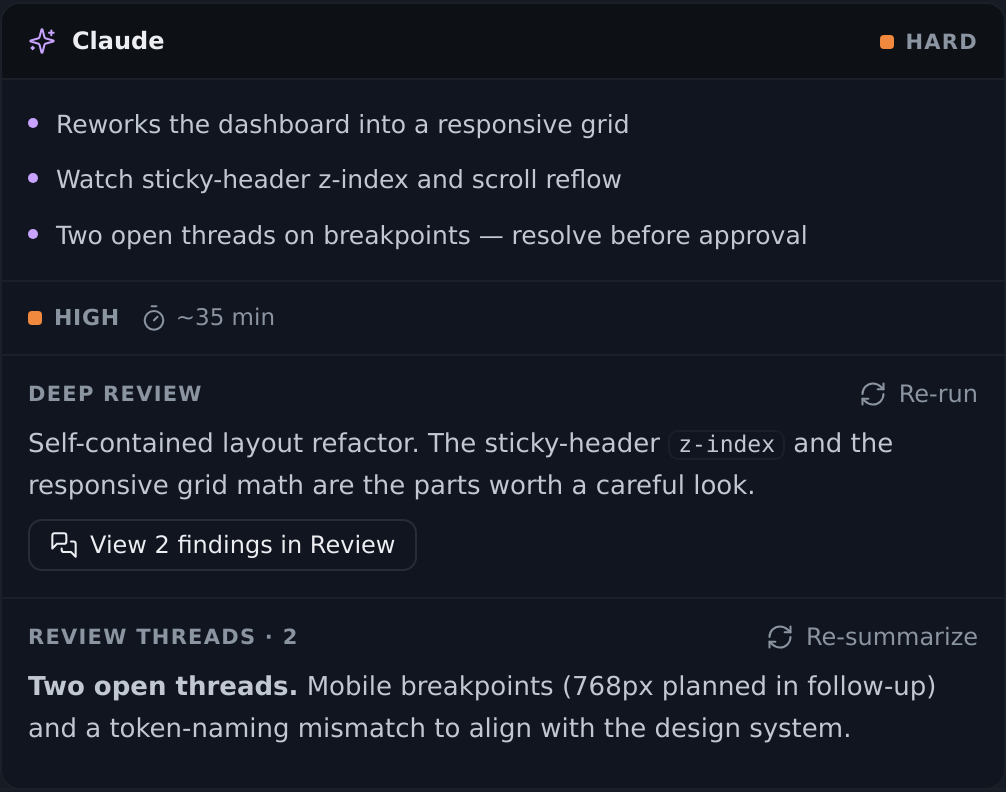
- Risk & Complexity: Every PR receives an estimated complexity label (e.g., easy to extreme) and a risk level (safe to critical). The read also weighs how much recent activity the changed files have seen — a file several people have been fixing lately is riskier ground than the diff alone suggests. When new commits change the PR head, the old estimate is marked outdated — see below.
- Thread Summaries: Your chosen provider distills long, chaotic review threads into a clean summary of what was asked, what was clarified, and what is still open.
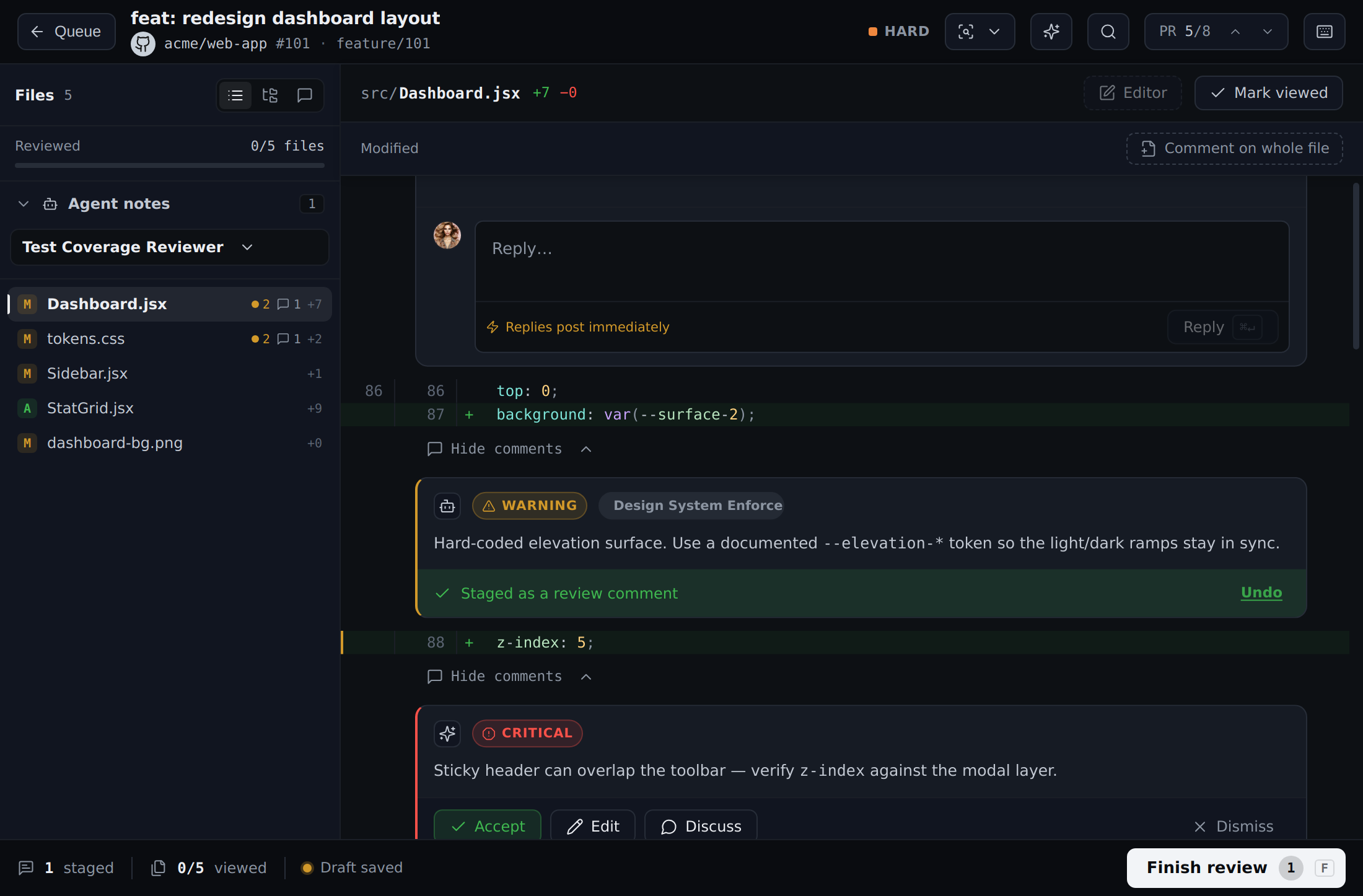
- Inline Findings: The AI generates specific findings pinned directly to the exact lines of code in the unified diff. You can accept a finding to turn it into a staged comment, or dismiss it.
Every AI result names the commit it was made against. Risk and complexity, the deep review and its findings, thread summaries and your own agents' results are each made against one version of the code, and the branch moves on without them. When it does, the result is marked outdated and names the commit it was made against. In PR Details and the review the mark is a button: click it to run that one result again — nothing re-runs on its own. In the list, the reading dims and its tooltip says why (on the classic row, click the dimmed risk dot to run it again); in the notification list, open the entry to run it again. A thread summary is also marked when the conversation changes. With the risk reading outdated, the list still ranks by it (so rows don't jump on every push), and "why it's ranked here" says the reading is outdated.
Findings are checked before you see them. A model naming a line number is a familiar way to be confidently wrong, so PR Flow reads the file and looks for the exact line the finding quoted. If it sits a few lines off — commonly pointing at the comment above a function rather than the function itself — the finding is moved to the right line. If the quoted line isn't in the file at all, the finding keeps its text but loses its line and lands on the file as a whole, rather than pinning a comment where it doesn't belong. Findings against files the PR doesn't touch are dropped. This works across every provider PR Flow supports.
Every result names the provider and model, the reviewed revision, and whether diff or repository coverage was partial — including, in PR Details as well as the review, whether it read your checkout or answered from the diff alone. Repository evidence is fetched by PR Flow itself, so Deep Review can inspect unchanged callers and definitions with any configured provider once you have mapped the repository and allowed access.
Manual deep reviews follow your Reactive pings notification preference. Automatic deep reviews finish quietly, so enabling auto-run doesn't produce background completion noise.
Discuss with AI
Not sure why a specific change is risky? PR Flow features a side-panel discussion interface right next to the code.
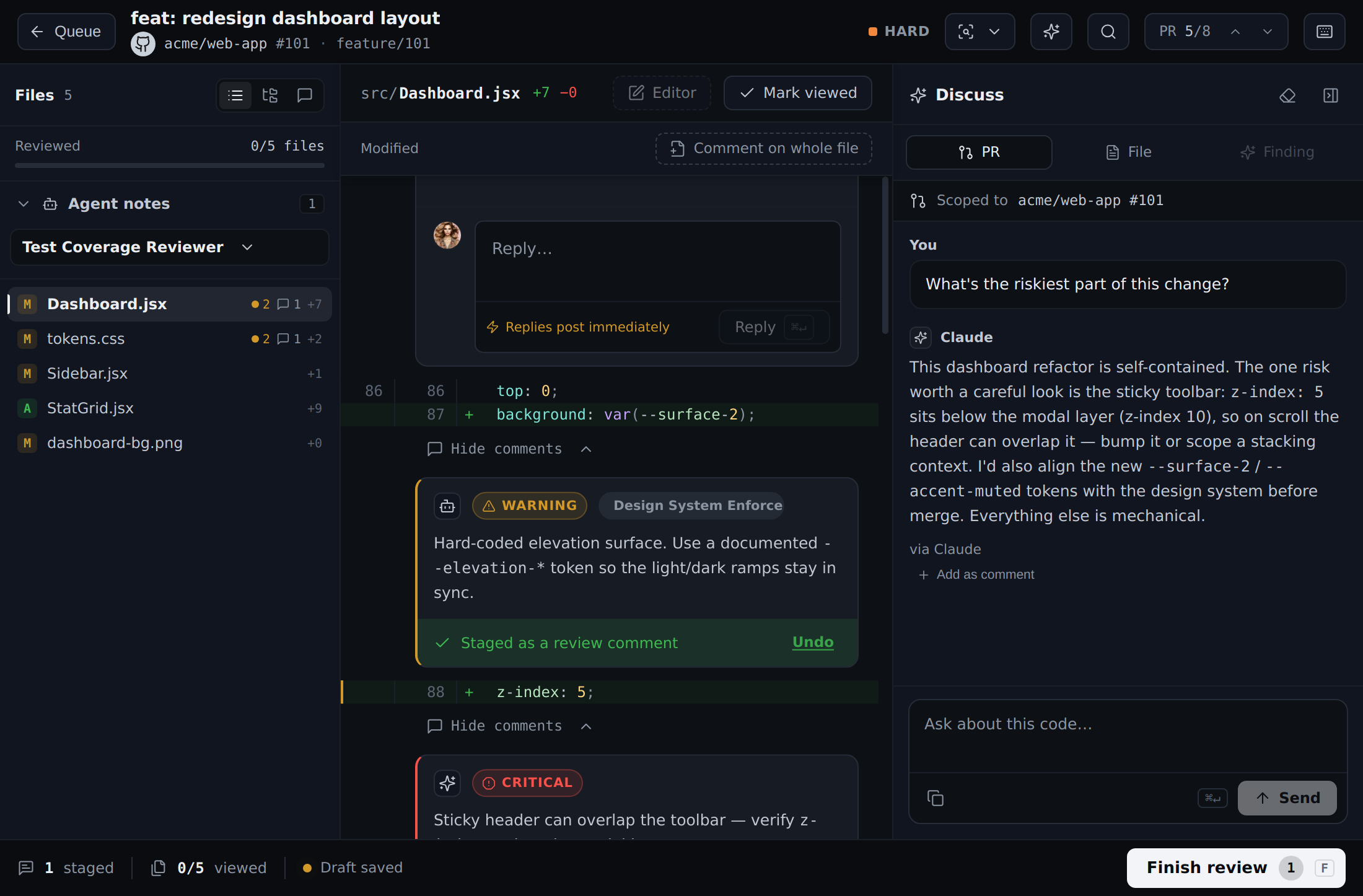
You can ask the AI about:
- A specific file
- A specific AI finding
- The entire PR
You can then take any of the AI's answers and drop them straight into your review as a comment.
The destination follows the scope you chose: a whole-PR answer joins the review summary, while a file-scoped answer becomes a staged file comment. Finding-scoped questions include the exact finding context whether it came from the built-in deep review or one of your own agents.
Discuss keeps the full conversation on device. Each turn sends a bounded recall containing the current question, recent exchanges, and earlier corrections that still fit; long messages are visibly shortened instead of being cut at an arbitrary character. Clearing a conversation cancels its work and removes that recall, so a late answer cannot bring it back.
Reading your local checkout
A diff shows what changed, not what it touches. The caller that was never updated, the contract the change breaks, the helper it duplicates — none of that is in the patch. Deep Review, Discuss, Change Story, and any custom agent that asks for it can read the surrounding code from a checkout you already have on disk.
PR Flow does the reading, not the model. The agent names the files and terms it wants; PR Flow fetches them and hands over plain text. That is why this works with every provider — including ones that expose no tools at all — and why the boundary is inspectable in one place rather than delegated to a model.
Turning it on
Two deliberate steps, because they are two different permissions.
- Map the repository. Settings → Repositories → Add repository, pointing at your local clone. Choose the repository root, and make sure one of its git remotes actually points at the repository the pull request is on — PR Flow checks, and refuses a folder it cannot confirm, rather than confidently reading the wrong code.
- Allow AI access to it. Mapping a folder lets PR Flow open files from it in your editor. Sending its contents to an AI provider is separate, and granted per agent.
You can allow access either way:
- When you run something. Start a Deep Review, a Change Story, or an agent, and PR Flow asks once, naming the agent, the repository, and the provider the code would be sent to. Discuss offers the same thing as a banner in the conversation.
- Ahead of time. Settings → Repositories → AI repository access lists every mapped repository against every agent that asks to read one, with Allow and Revoke for each.
Agents that run on their own need the second option. An agent that runs when you open a review, or quietly across your board, has no moment at which it could ask you — so until you allow it here, it will keep answering from the diff alone.
What it will and will not read
- Committed code only, at the revision under review. Reads are pinned to a revision, so your uncommitted work is invisible by construction rather than by a rule that might miss.
- Nothing you own moves. No checkout, no branch switch, no working-tree file, no index. A dirty tree is fine and stays untouched.
- Credentials are refused. Files such as
.env, private keys, and anything under a secrets or credentials path are never sent, whatever an agent asks for. - Bounded. An agent gets a limited number of files and searches per run, each capped in size — enough to answer a question, not enough to ship your repository anywhere.
- Revocable and logged. Revoke any grant at any time in Settings → Repositories. Every read and every fetch is recorded in the local audit log, with the revision and the exact paths.
A grant is also re-asked rather than silently inherited when the ground moves: editing an agent's instructions, or routing its task to a different provider, invalidates it, because you consented to specific instructions sending code to a specific destination.
Knowing which you got
Results say which they are. A result written with the repository open names the revision it read, and says so when coverage was partial. One written without it says diff only and gives the reason — no mapped checkout, access not allowed, or the revision not present locally. An agent that asked for repository context and did not get it is told as much in its own instructions, so it reports what it could not check instead of assuming there was nothing to find.
Public web search
Discuss, Deep Review, Change Story, and custom agents can request provider-native web search for public, version-relevant documentation. Claude and Codex expose this capability today; unsupported providers continue with the pull request and repository evidence and label web search unavailable. Custom agents must include Public web search in their context before it is enabled, so existing agents do not gain network access after an upgrade.
Web-derived claims include their public source URLs and stay separate from repository evidence. PR Flow instructs agents never to search for source code, ticket text, repository names, internal hosts, or confidential identifiers. Team administrators can disable native web search for every managed seat while keeping the rest of AI available.
Audit logs
Two separate, on-device logs keep everything transparent — both stay on your machine and are never synced:
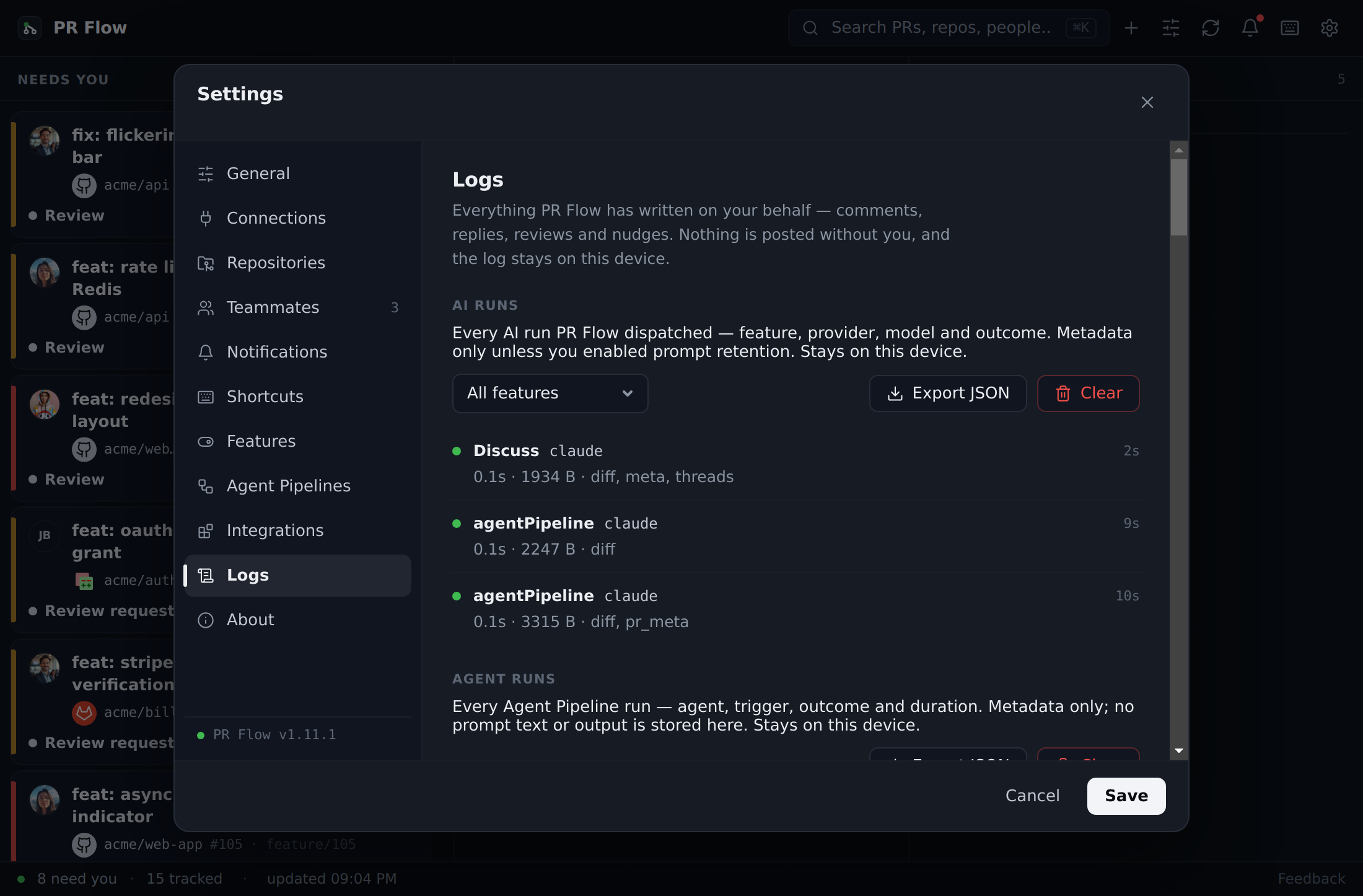
- Settings → Logs → AI runs — a record of every AI run: the feature, effective provider and model, size, duration, and outcome. JSON export groups related attempts and fallbacks into one operation, reports the final outcome, and marks exports incomplete if log health metadata is unavailable. It's metadata-only by default; storing prompt or result contents is an explicit opt-in, and either kind of retained content can be purged independently.
- Settings → Logs → Write actions — because PR Flow acts as an assistant, nothing is posted to GitHub/GitLab without your explicit submit. This log captures every comment, reply, review, and nudge it wrote on your behalf.
For teams
Organizations can standardize AI on an approved provider or internal gateway. A team's license can lock AI to specific providers and disable provider-native web search, enforced on every seat. A locked policy with no providers intentionally disables AI on every seat instead of falling back to a personal provider. Reach out for Enterprise setup.