The Feed & Board
Stop scanning. Start with what's blocking.
PR Flow's primary interface replaces the endless scrolling of standard pull request pages. Every open PR is classified into smart views that put the next decision at the top of your list.
View Layouts
You can customize how PR Flow displays your queue depending on your workflow preferences:
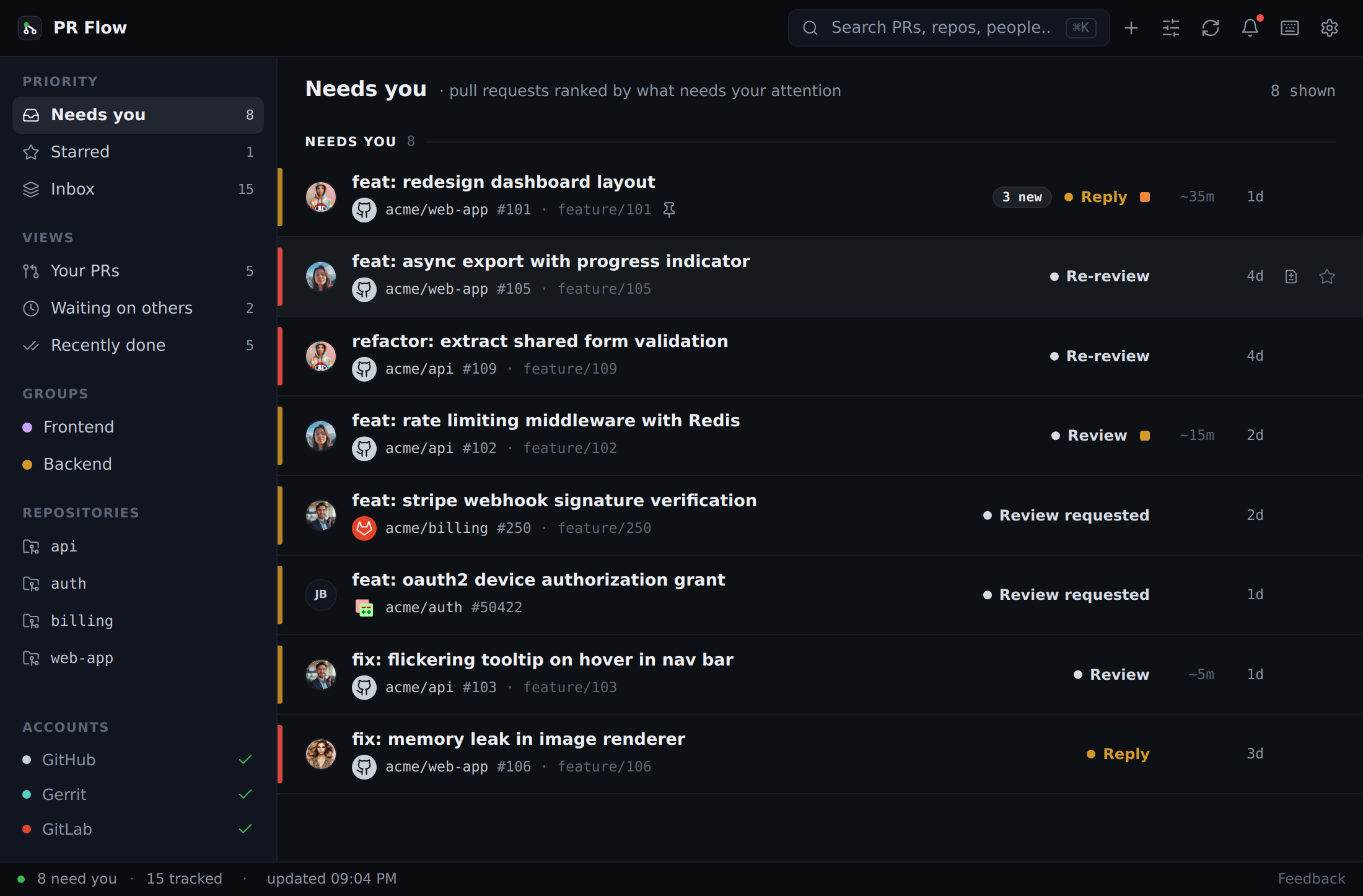
Feed View: A unified, top-to-bottom list ranked strictly by priority. The item at the very top is the most urgent thing blocking your team.
Board View: A Kanban-style interface that separates PRs into columns: Needs you, Waiting, and Done.
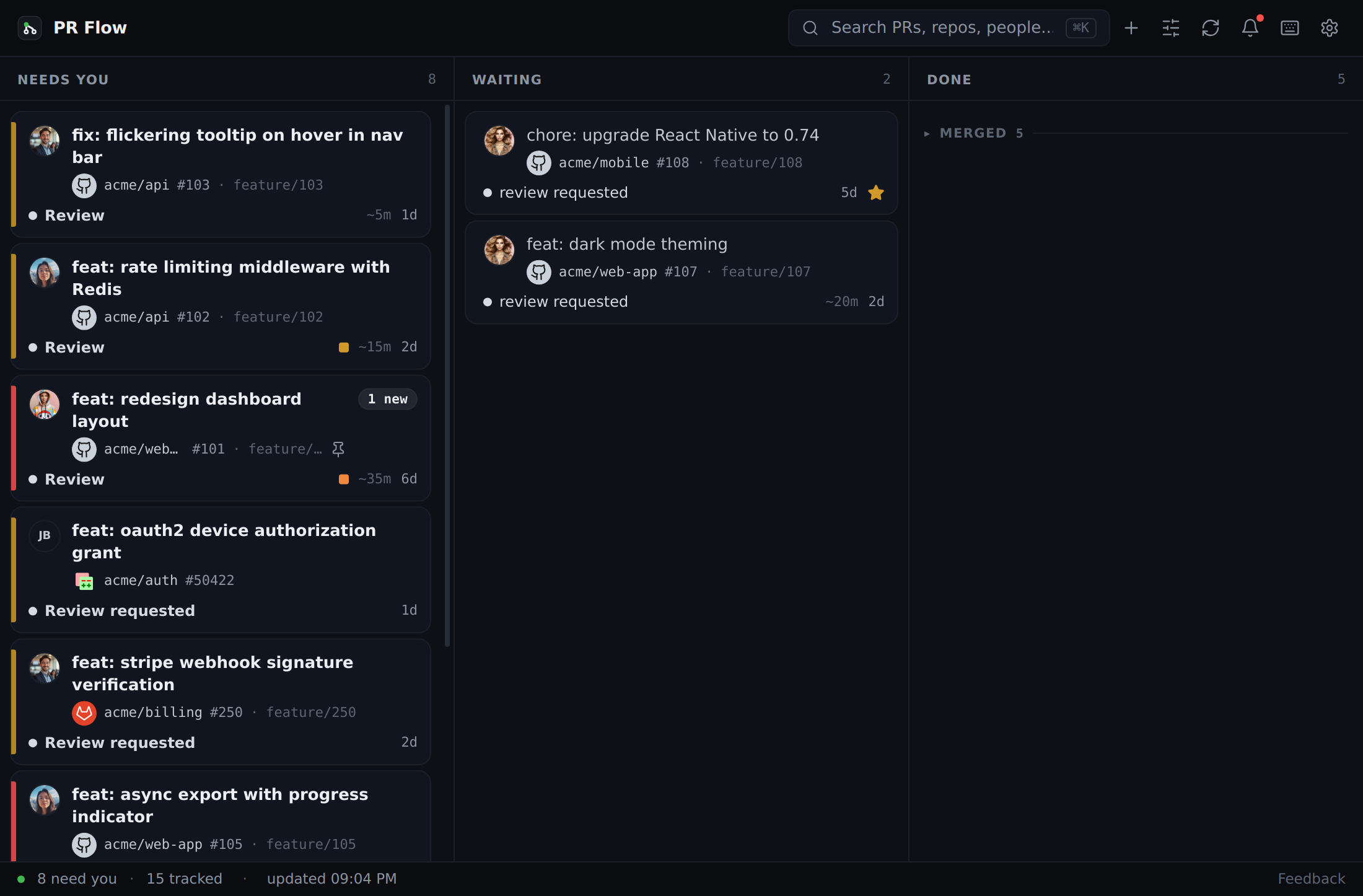
Both layouts rank pull requests identically — the board is the same queue turned ninety degrees, not a second opinion. The menu-bar glance and the daily digest use that ranking too, so "the top of your list" means the same thing everywhere you see it.
Choosing how the list is ordered
Open Filters and use the Sort control at the top:
- Urgency (the default) leads with what needs you most: how long it has been waiting, unresolved conversations, risk, unread activity, whether someone asked for you by name, and whether a change is conflicting. A pull request you've starred stays pinned above the rest.
- Quick wins leads with the smallest changes instead, using urgency only to break ties — for when you have twenty minutes and want to clear several reviews rather than start the hardest one.
Estimated complexity is a tiebreaker under Urgency, not the headline: a large, risky change that has been waiting a week outranks a one-line fix opened this morning.
Layers of the same stack stay together in the list, ordered from the foundation upward, so the layer worth opening first is the one you reach first. See Stacked pull requests.
Smart Lanes
Regardless of the view you choose, PR Flow classifies every PR into three distinct states based on its current metadata (approvals, requested reviewers, CI status, merge state, and threads).
1. Needs you
This is your inbox. PRs land in the Needs you lane if:
- A teammate explicitly requested your review, and their PR is actually reviewable.
- A PR you authored requires you to resolve requested changes or reply to an open thread.
- A PR you authored has been fully approved and is ready for you to merge.
Reviews you owe surface above your own PRs.
A review request from someone outside your team lasts as long as the request. When their pull request is on your board only because your review was asked for (on Gerrit, because you're in the change's attention set), PR Flow checks it again once your provider stops listing it. If the request was withdrawn, you already reviewed it on the web, someone else merged or closed it, or on Gerrit it's no longer your turn, it leaves your board instead of staying as Review requested.
A teammate's PR that can't land yet doesn't ask for your review. If it has failing CI, a merge conflict, or unresolved AI review items, only its author can make it reviewable again — so it waits on them instead of sitting in your inbox. A reply you personally owe someone is different: answering a person doesn't depend on whether the branch merges, so an open thread keeps the PR in Needs you either way.
See who is waiting
When a conversation needs your reply, the reason names the person and the number of open conversations — for example, Approved · Reply to Alice ×2. Approval does not silently clear a question that still belongs to you.
Hover or focus the reason to preview every conversation, including its author, latest message, and file location when one is available. Each preview opens that exact conversation. Conversations attached to older code stay in the list as Outdated but unresolved until someone resolves them.
The same explanation appears in Feed, Board, PR Details, and the menu-bar tray. Long names shorten visually in compact desktop windows, while the state and reply count remain visible and the complete wording remains available to assistive technology.
Why does this need me?
Every pull request states where it stands. A PR that needs you shows the reason; one that does not shows who it is waiting on, in a quieter style so it never competes with your actual work. A pull request is never left without an explanation.
When a reason is not enough on its own — Review items 2, or a reason with a +1 for something else also outstanding — open the pull request and pick the Needs you tab. It lists every outstanding item with the evidence behind it: who requested changes and what they wrote, which checks failed, and which automated reviewer raised which finding, in which file.
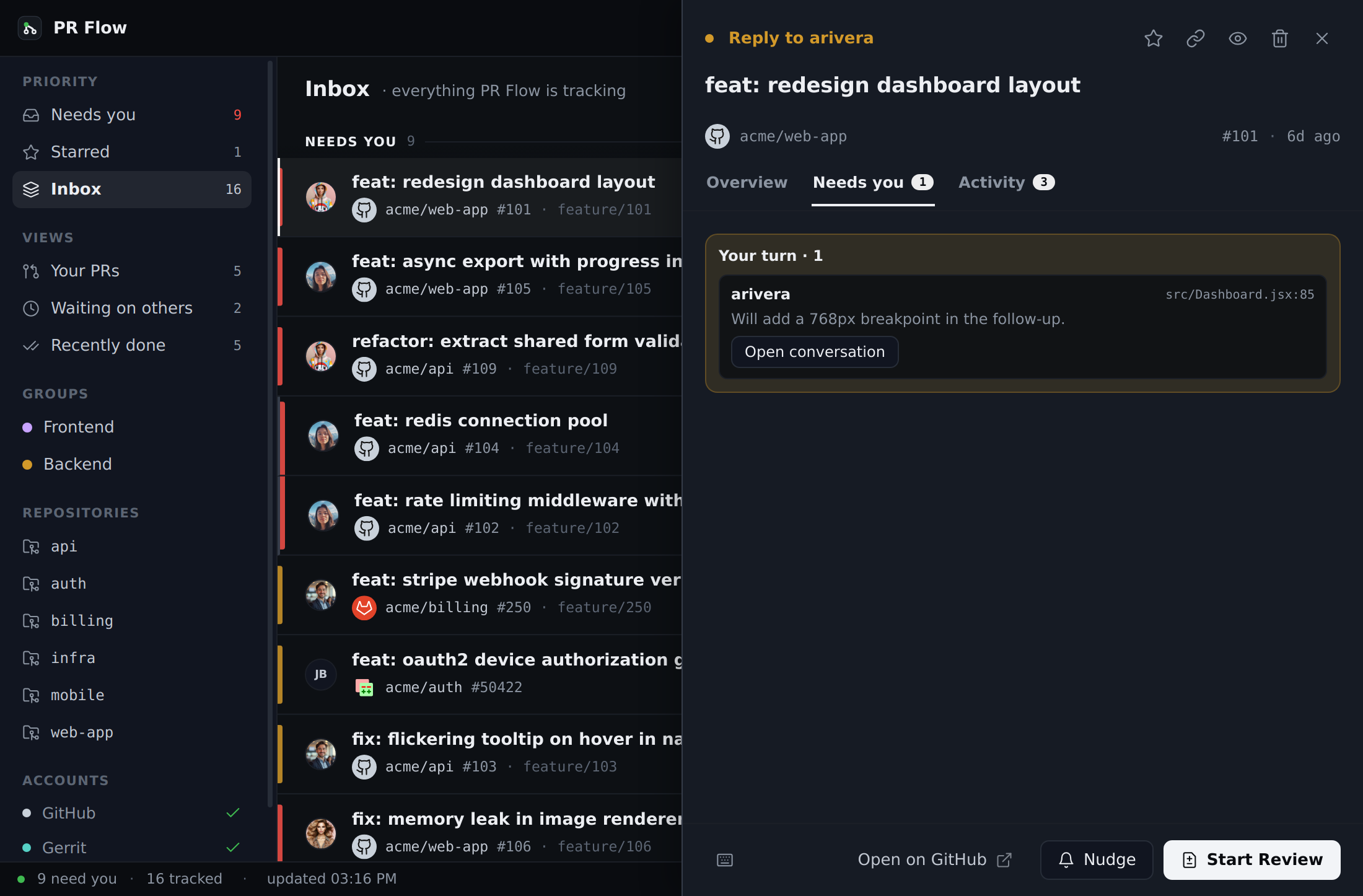
The tab appears only when that pull request genuinely needs something from you, and carries a count. Opening a pull request always lands on Overview, so the tab never takes over your view — the count is how you notice there is something to read. Conversations you owe a reply to appear here too, under Your turn.
Where a provider cannot supply a detail — GitLab and Gerrit do not expose links for individual checks, and Azure DevOps does not expose review bodies — PR Flow says so plainly rather than showing an empty explanation.
2. Waiting
This is your outbox. PRs land in the Waiting lane if:
- You authored the PR and are waiting on teammates to review it.
- You started reviewing a teammate's PR, left comments or requested changes, and are waiting for them to address your feedback.
- Someone else started reviewing that PR and left comments or requested changes.
- A teammate's PR is blocked on its author — failing CI or a merge conflict they need to fix first.
A waiting pull request names who holds it — Waiting on author, Waiting on review, or Waiting on CI — instead of restating its raw state.
3. Done
PRs move here temporarily once they are merged or closed, giving you a quick history of recent activity.
Compact row
Every pull request reads as five icons in five fixed columns. Everything PR Flow knows about it sorts into five categories, and each gets one icon in a fixed position, on every row:
| Icon | Category | What it covers |
|---|---|---|
| Inbox | Needs you | why it is on your plate: changes requested, a review asked of you, a reply owed, a re-review, a conflict, red CI |
| Speech bubble | Conversation | unresolved threads, replies you owe, who is waiting |
| Merge | Landing | checks, conflicts, approvals — whether it can merge |
| Book | Reading | how much there is actually to read, and what the AI made of it |
| Layers | Context | stack position, related changes, whether you are tracking it |
The column never moves. A category with nothing to say is still drawn, in the faintest ink — that is what keeps the five columns aligned down the list, so it is read as five columns rather than as a sentence per row.
Colour still means state, and only state. The first three can take one; Reading and Context never do. How much there is to read is arithmetic on the diff, and what a change connects to is a fact about where it sits — neither is a state, and colouring them would make the queue harder to scan, not easier.
A number on an icon counts what is behind it — reasons, outstanding threads, failing checks, files worth reading. It turns white when that part of the pull request moved since your last visit, which replaces the old single "N new" count: a white number on Conversation and another on Reading says a reply landed and the code moved, which is the part you have to act on. Where something moved but there is nothing to count, the mark is a plain white dot — including on an icon that is otherwise empty, so a comment on a thread you had already resolved still shows up.
A failing check is not always a blocking check
A repository can run fifty checks and require seven of them. PR Flow reads the difference, so a red check your repository never made a merge requirement no longer puts a pull request on your plate.
Landing still shows it — the count is there, worded as "1 check failing, not required to merge" — but in the neutral ink, because colour on that icon means this is holding the merge. Needs you stays quiet, an approved pull request can still read Merge ready, and a teammate's change stays in your review queue instead of being hidden behind a lint that was never going to block it.
Every provider is asked in its own terms: required checks on GitHub, jobs allowed to fail on GitLab, submit requirements on Gerrit, and whether a policy is blocking on Azure DevOps. Where a provider cannot say — an older server, or a check it will not classify — PR Flow assumes the check blocks and shows it in red, exactly as before. It never guesses a failure away.
Two honest limits on that. Landing marks itself as moved only where your provider timestamps its checks, which today means GitHub. Context is never marked: a stack re-shaping under you is not something PR Flow counts as activity.
Hover any icon for the same thing in words, including the parts that do not fit a number: which checks failed, who is waiting, which commit the AI read. Every icon is announced to a screen reader with the same detail. The two that open something — the ranking explanation and the conversation list — are reachable from the keyboard; the other three are read-only and carry their detail in the tooltip and the accessible name.
Prefer the earlier row, with its worded state chip and review-size label? It is still there — Settings → Layout → Compact row, switched off. Both read the same record; only the shape differs.
Visual Indicators
PR Flow uses subtle visual cues to help you scan your queue:
- Attention Borders: A 4px left border encodes how much a pull request needs you (Calm , Warm , Hot ). It reads the same ranking that decides the row's position, so a calm-coloured row never sits above a hotter one. A stack shares one marker across its layers, because they are ranked together.
- Action Reasons: Borderless state-colored text explains the next action. Hover or focus it to see why a pull request ranks where it does — what needs you, and what pushed it up the list. A visible outline appears only for keyboard focus. Pull requests that are merely waiting, merged, closed, or still drafts use the same spot in a muted style, so scanning for colour finds only work that is actually yours.
- Risk Ramps: If AI features are enabled, a small dot (from safe to critical) indicates the complexity and risk of the diff.
- Review size: Quick, Medium or Deep dive, read from the change itself rather than estimated — so it is there with AI switched off. Where your provider lists the files in a change, lockfiles, generated code and vendored directories do not count toward the size, which is why a large dependency bump reads as Quick, and long documentation counts as the reading it is rather than by the line. Code touching a migration, a schema or an authentication path is called a deep read however small it is — code specifically: a document that merely mentions one is still Quick. Where a provider reports nothing about the size of a change, no band is shown rather than a guess, and a pull request you are re-reviewing shows none either — the size a provider reports covers its whole life, not the part you have yet to read.