Troubleshooting & Logs
Common questions, error handling, and where to find logs.
Because PR Flow runs entirely on your local machine, monitoring and troubleshooting look a bit different than traditional web applications. This guide covers how PR Flow handles errors, where to find audit logs, and answers to common questions.
Monitoring & Error Handling
PR Flow is designed to be resilient to network blips and API rate limits.
- Background Polling: The app polls your Git providers in the background. If a request fails (e.g., your internet drops or GitHub rate-limits you), PR Flow silently catches the error and retries on the next interval with exponential backoff.
- Action Safety: Destructive actions (like submitting an AI-generated review or posting a comment) are never performed automatically. You are always required to explicitly click Submit.
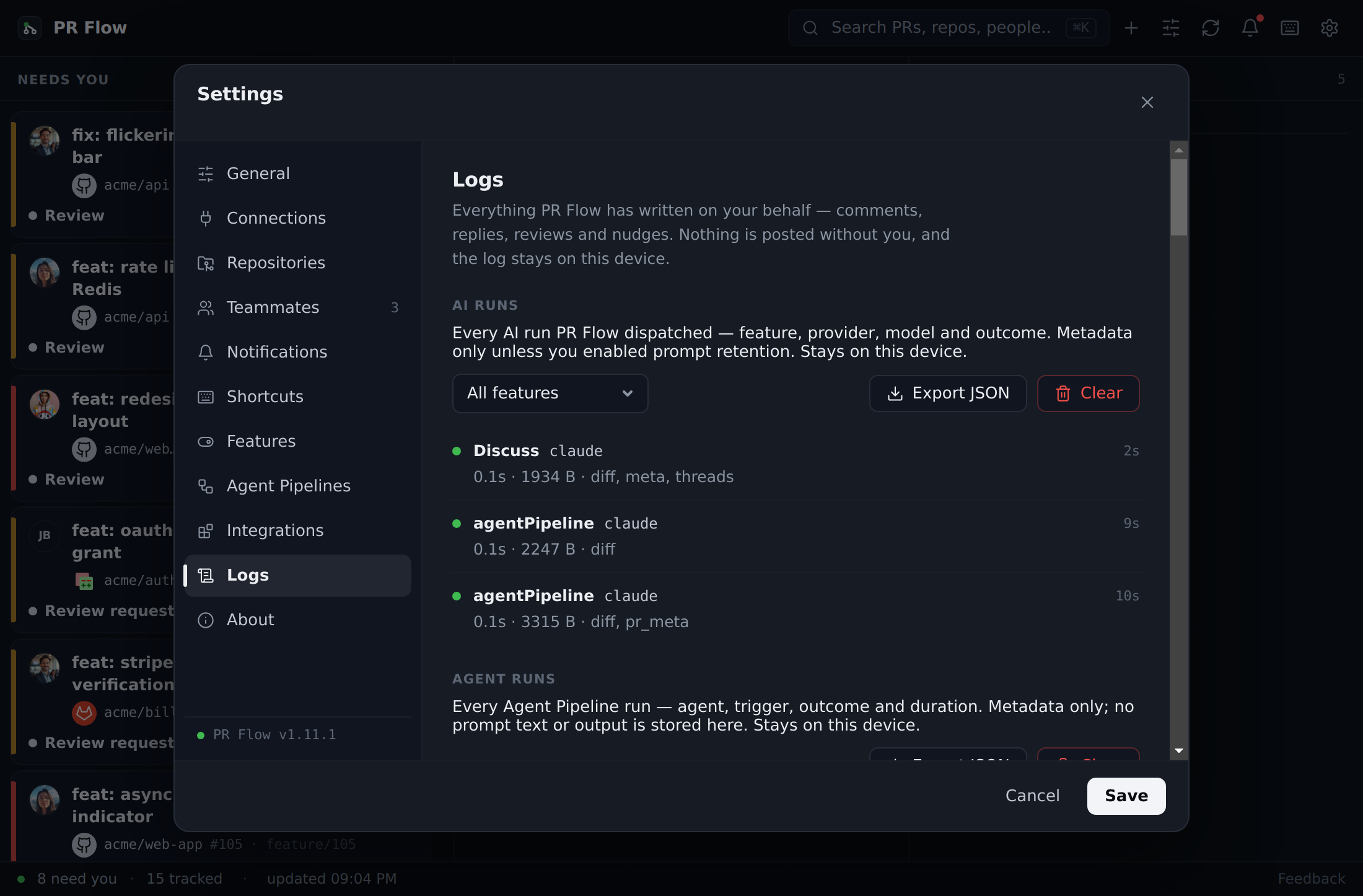
- Audit Logs: PR Flow keeps separate on-device trails for AI runs and provider actions. AI runs record which feature, provider, and model ran and how it ended; provider actions cover writes performed on your behalf and the underlying reads used to fetch and sync data.
Viewing Logs
If an AI run fails, an action does not post, or you want to inspect what data is being fetched, you can view the relevant audit trail directly in the app:
- Open Settings.
- Navigate to the Logs tab.
- Open AI runs to inspect model activity and export its audit trail, Write actions for everything PR Flow wrote on your behalf, or Provider reads for what it asked your providers for. Each section has its own filters, export and expandable details appropriate to that log.
Frequently Asked Questions
Why does PR Flow say it couldn't reach the license server?
Activating a key and starting the trial both need a connection to the PR Flow license server. On a company network the usual cause is a blocked host, a proxy, or TLS inspection. Network Access & Offline Use lists the hosts to allow and explains each license message.
Why isn't my Jira ticket linking?
Jira integration requires the Atlassian CLI (acli) to be installed and authenticated on your machine. PR Flow uses this CLI to fetch ticket metadata securely.
brew install atlassian/tap/acli
acli auth login
- Ensure your Jira base URL is configured correctly in PR Flow Settings (it must end with
/browse/).
Why is a PR stuck in my "Waiting" lane?
The Waiting lane acts as your outbox. A PR will stay there if:
- You authored it and are waiting for teammates to approve or request changes.
- You started reviewing a teammate's PR and left comments (or explicitly requested changes), and you are now waiting for them to address your feedback.
Once they push new commits or reply to your threads, the PR will automatically jump back into your Needs you lane.
How do I clear my local cache or settings?
All of your settings, cached states, and teammate groups are stored locally on your machine. If you need to perform a hard reset, you can delete the PR Flow application data directory.
How do I force a refresh?
PR Flow automatically polls your Git providers every 60 seconds. If you want to force an immediate refresh, you can completely close the application (ensure it is quit from the menu bar) and reopen it.